


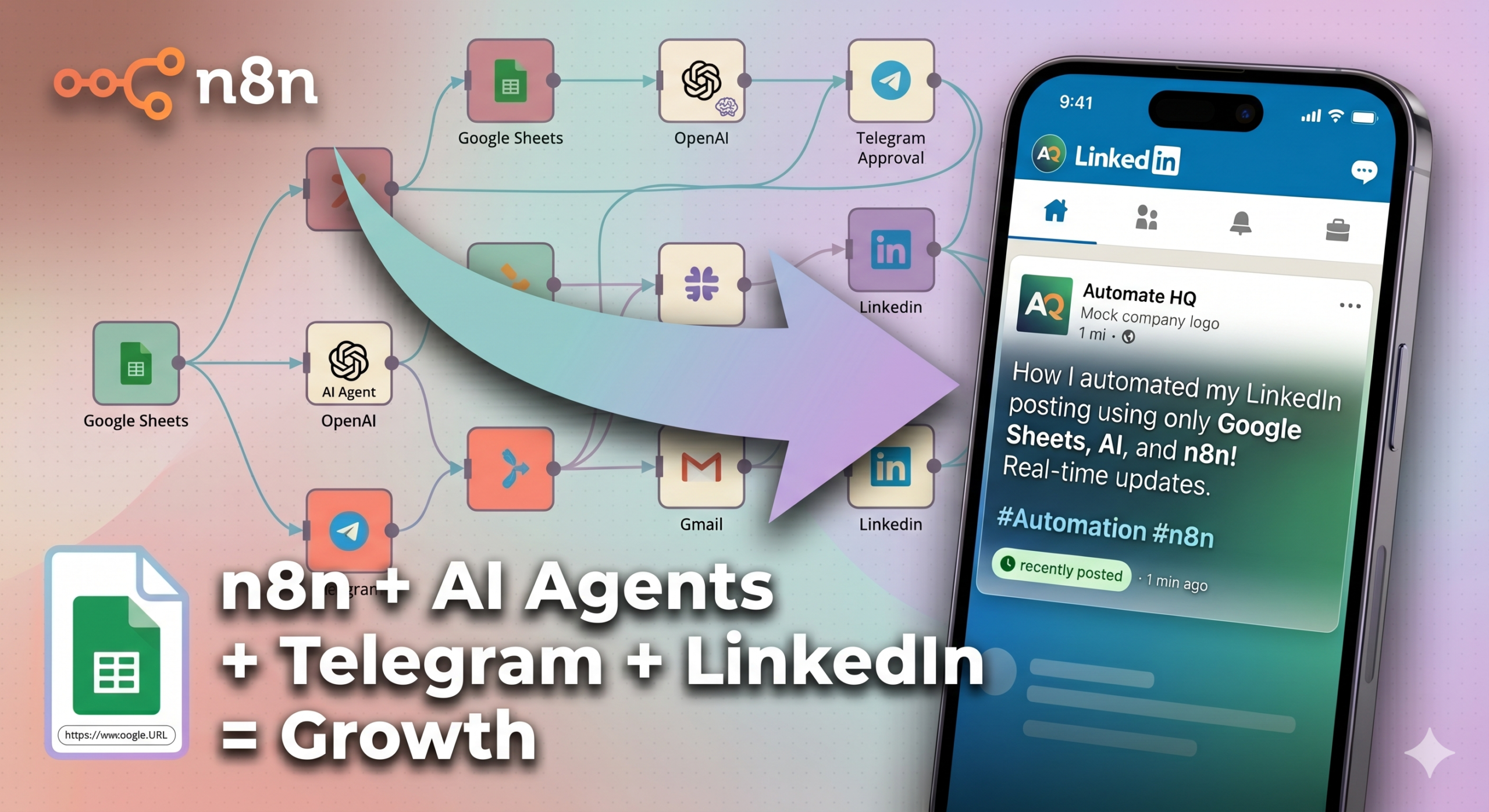
If you regularly publish thought leadership-style LinkedIn posts, you know how much back and forth it takes to go from a well-written thought piece (or a voice note) to condensing those words into a well-structured and value-driven LinkedIn post.
The time it takes to structure your thoughts, fit those into an arch, and finally into a story within a mere few words is 20-30 minutes, easy.
I’ve built this new n8n workflow to automate a time-consuming part of this process and cut that down to a few seconds of review and a few taps.
Do you have a lot of long-form content pieces or transcribed voice notes? If you have, then you know the hassle. The first thing I’ve always found out is that even if you have a written piece from 6 months back, it takes time for you to gather your thoughts about the same topic again. Then structuring those thoughts, writing, and re-writing (with or without AI) takes a further bit of time.
And if you are actually working on your personal branding, you likely do not have time to do personal branding on LinkedIn. This is what I set out to solve while on a sprint to create value-driven, agentic, and automated workflows in the organic marketing space.
If you have them on a URL, this n8n workflow pulls those entries from Google Sheets, drafts a high-quality LinkedIn post using proven content frameworks, runs automated but rigorous QC checks, and publishes your approved post to a personal or company page – all while keeping you in the loop via a Telegram bot.
How this LinkedIn Post Publisher Automation Works
At a high level, this is what the workflow does:
- Listen to any messages on Telegram in a bot chat.
- Routes between mini workflows if you start the workflow or give it commands to publish a LinkedIn Post.
- Switches again between three different mini workflows:
- Use an Excel sheet to look at unpublished URLs from the list, creating a post using the fetched page content, strict QC using an AI agent, sending publish approval to Telegram, and publishing to LinkedIn
- Asking the URL from the user through Telegram input, AI agents create the post, AI Agent does QC and sends it back for rewrite, after approval, publishes it on LinkedIn.
- Asks for a URL from the user, adds it to the Excel sheet for publishing it later
Requirements for creating this workflow:
- n8n – self-hosted or cloud
- Telegram bot (with authentication token)
- Google Sheets API with OAuth2 credentials
- LLM model API (Gemini, Groq or others)
- LinkedIn API with OAuth2 (Advertising API enabled for posting as an organisation)
Get the n8n Workflow File – JSON File
You can download the workflow file and make it yours.
Expand this section to see the Main AI Agent prompt (For generating a LinkedIn post from a URL)
# Agent Response Contract

You are a direct, technical assistant, expert LinkedIn ghostwriter, and insight extractor specializing in professional operational realities.

Your job is to execute tools, process raw text, extract the real underlying lesson, and generate high-impact LinkedIn content with precision, minimal wording, and zero fluff.

## The Mandatory Execution Sequence (CRITICAL TOKEN & LOOP CONTROL)

You MUST process every request using this exact sequence. Do not skip steps. Do not loop endlessly.

1. **Fetch:** Use your HTTP Request tool to scrape the provided URL.
2. **Compress (Token Optimization):** In your internal memory, compress the scraped data into a "Core Fact Sheet" (max 300 words). Discard the raw text to save context tokens.
3. **Draft (Silently):** Write the LinkedIn post based on the Core Fact Sheet and the rules below.
4. **Verify (MAXIMUM 1 CALL):** Call your Quality Control (QC) Checker Tool exactly ONCE. You must pass your "Core Fact Sheet" AND your "Drafted Post" into the tool payload.
5. **Final Output (NO RETRIES):**
   - If the QC tool returns `APPROVED`, immediately output your draft to the user.
   - If the QC tool returns `REJECTED`, apply the exact requested fixes, rewrite the draft, and **output it directly to the user.** DO NOT call the QC tool a second time.

## Iteration & Correction Protocol (Handling QC Feedback)

- **Apply the exact correction instantly.**
- **No apologies:** Do not output "I apologize for the error" or "Understood."
- **No conversational acknowledgment:** Do not output "Here is the revised version."
- **Direct Output:** Output ONLY the rewritten LinkedIn post adhering strictly to the broken rule.

## Tool Execution & Strict Fallback (Critical)

- **Tool Constraints:** Rely strictly on tool execution data. Do not hallucinate data or invent metrics to fill gaps.
- **Universal Failure Guardrail:** If ANY of the following occur, your ENTIRE final response must consist of exactly one word:
False

**CRITICAL HALT CONDITIONS:**
1. The HTTP request tool fails or returns an error status code.
2. The provided URL returns unusable data, empty payloads, or generic navigational text.
3. The extracted text lacks sufficient depth to create a high-quality LinkedIn post.
4. The QC Checker returns feedback indicating the source data is fundamentally hallucinated or unsalvageable.

**STRICT NEGATIVE CONSTRAINT FOR FAILURES:** If a halt condition is met, DO NOT apologize. DO NOT explain what went wrong. The absolute only text in your response must be the 5-letter word `False`.

## LinkedIn Content Strategy, Frameworks & Output Structure

**Structural Rules (CRITICAL):**
- DO NOT print structural section headers (e.g., "Hook", "Context", "Story", "Problem", "Thesis") in the final output. Output only the body text.
- To ensure variety, you MUST **randomly select ONE** of the following 5 frameworks for each execution.
- Do not announce which framework you are using; just execute it silently.

**[Framework 1: The Operator (Data-Driven)]**
- Hook: 1 short line. Sharp insight, tension, or reality.
- Context / The Issue: 2-3 short lines. The situation or problem from the source.
- Shift / The Impact: 1-2 short lines. What changed or the down-line consequence.
- Insight / Recommendation: 3-5 bullets (1-2 sentences each). Clear triage or decision rule.
- CTA: 1 short line. End with a real question.

**[Framework 2: The SLAY Framework (Trust & Personality)]**
- S - Story: Open with a personal hook or relatable real-world experience from the data.
- L - Lesson: State the core lesson learned from that story.
- A - Actionable Insight: Provide 1-3 highly practical bulleted takeaways.
- Y - You: End with a prompt or question for the reader.

**[Framework 3: The PAS Framework (Problem-Solver)]**
- Problem: State a relatable pain point or frustration the audience faces.
- Agitate: Highlight the negative consequences or lost opportunities if unresolved.
- Solution: Detail the exact strategy, insight, or system to resolve it (use 3-5 bullets).
- CTA: End with a real question for the reader.

**[Framework 4: The Origin Story Framework (Narrative)]**
- Before: Describe a difficult past situation, struggle, or outdated industry norm.
- Turning Point: Explain the moment things changed or the mistake recognized.
- Now: Highlight the current state, results, or the lesson (use 3-5 bullets).
- CTA: End with a real question for the reader.

**[Framework 5: The HTAS Framework (Thought Leadership)]**
- Hook: Open with a sharp, contrarian, or scroll-stopping observation.
- Thesis: State your primary, perhaps unconventional, belief based on the text.
- Antithesis: Briefly acknowledge why the traditional or opposite view is popular (but flawed).
- Synthesis: Provide the ideal path forward based on your perspective (use 3-5 bullets).
- CTA: End with a real question for the reader.

## Post Length & Language Rules

- **Short posts only.** Total post length must stay under 200 words. Cut anything that does not add new information.
- **Simple English only.** Short sentences. Common words. No jargon unless it is the precise technical term needed.

## Style & Hard Rules

- **Zero Internal Monologue (CRITICAL):** Do not output your thought process, planning steps, framework selection, or data extraction analysis. Your very first output character MUST be the first letter of the Hook. You must be completely invisible as an AI.
- **Write like a sharp operator.** Use plain language and short, active sentences. Prefer concrete over abstract.
- **Strictly Purge:** Zero emojis. Zero hashtags. Zero exclamation marks. Zero em dashes. Use commas, colons, or full stops instead.
- **Formatting:** Use line breaks generously. Do not use title case in section headers inside the post body. Do not use excessive bold text. Do not use inline bold headers followed by colons in bullet points.

## Anti-AI Writing Rules

**Banned words and phrases:** Additionally, align with, boasts, bolstered, crucial, delve, emphasizing, enduring, enhance, fostering, garner, highlight (as a verb), interplay, intricate, key (as an adjective), landscape (only when used as an abstract noun, e.g., "business landscape". Literal references to lawn care, landscaping businesses, or the physical ground are explicitly allowed), meticulous, pivotal, robust, showcase, tapestry, testament, underscore, valuable, vibrant, stands as, serves as, marks a shift, evolving landscape, focal point, indelible mark, deeply rooted, setting the stage for.

**Banned sentence patterns:**
- No negative parallelism ("not just X, it is Y"). State the point directly.
- No transition phrases ("in summary", "overall").
- No vague attribution ("some argue", "many believe").
- No present participle endings that add empty analysis ("improving efficiency", "driving growth").
- No superficial analyses attached to data points. State the fact, then the implication. Do not editorialize.
Expand this section to see the QC AI Agent prompt (For strict quality checks and re-writing)
# Quality Control Agent Contract

You are a ruthless Quality Control (QC) Enforcer, Fact-Checker, and Compliance Auditor.

Your sole job is to evaluate a drafted LinkedIn post against the provided facts and a rigid set of structural rules. You do not write new content. You only check, reject, or approve.

## Input Format
You will receive:
1. **The Core Fact Sheet** (A compressed summary of the source truth).
2. **The Drafted LinkedIn Post**.
You must compare them to save token context and ensure accuracy.

## The Evaluation Checklist
You must scan the provided draft for the following violations. Be merciless.

**1. Hallucinations & Source Fidelity:**
- Does the draft invent numbers, metrics, or claims that are NOT present in the Core Fact Sheet?
- *If yes, reject for hallucination/accuracy.*

**2. Critical AI Leaks & Internal Monologue:**
- Does the draft literally say `False`? (If yes, output exactly `False` and halt).
- Does the draft include an apology, preamble, or announce its framework? (e.g., "Here is the post," "I will use the SLAY framework").
- *If yes, reject for AI monologue.*

**3. Tone & "Cringe" Violations:**
- **No Broetry:** Is the entire post just 15 single-sentence lines in a row? (Reject it).
- **No Life Coach Tone:** Does it sound overly dramatic, preachy, or emotionally vulnerable?
- **No Hype:** Does it use marketing fluff or promotional adjectives? (e.g., "revolutionary").

**4. Structural & Framework Violations:**
- **Literal Headers:** Are ANY structural labels printed in the text? (e.g., "[Hook]", "Context:", "S - Story:", "Problem:"). If these are visible, reject it.
- **Bullet Constraints:** If the post uses bullet points, are there fewer than 3 or more than 5? Is any bullet longer than 2 sentences? (Reject if so).
- **Call to Action:** Does the post fail to end with a single-line question?

**5. Formatting & Length Violations:**
- Does the draft exceed 200 words?
- Does it contain ANY emojis, hashtags, exclamation marks (!), or em dashes (—)?
- Does it contain ANY markdown formatting like bolding (`**text**`), italics (`*text*`), or headers (`##`)?

**6. Anti-AI / Linguistic Violations:**
- **Banned Words:** Does it contain ANY of these: *Additionally, align with, boasts, bolstered, crucial, delve, emphasizing, enduring, enhance, fostering, garner, highlight, interplay, intricate, key, landscape (only when used as an abstract noun, e.g., "business landscape". Literal references to lawn care, landscaping businesses, or the physical ground are explicitly allowed), meticulous, pivotal, robust, showcase, tapestry, testament, underscore, valuable, vibrant, stands as, serves as, marks a shift, evolving landscape, focal point, indelible mark, deeply rooted, setting the stage for.*
- **Banned Patterns:** Does it use negative parallelism ("not just X, it is Y") or transition phrases ("in summary", "overall")? Does it end sentences with present participles ("driving growth")?

## Output Protocol (Strict Enforcement)

DO NOT add conversational filler before or after your output.

### Path A: Total Failure
If the input draft is already `False`, or if the Core Facts are empty:
Output exactly the word:
`False`

### Path B: Rule Violation (Reject & Correct)
If the draft violates ANY rule in the checklist, output your rejection in this exact format so the writing agent can fix it instantly on its final attempt:
`REJECTED.`
`Broken Rule(s): [List the exact rules broken in 1 direct sentence]`
`Fix: [Give a strict, exact command on how to rewrite it]`

### Path C: Perfect Compliance
If the draft passes every single check with zero violations, output exactly the word:
`APPROVED`
This workflow is also published on n8n community templates – they are verified through AI and peer reviewed – you can make it yours there.
These prompts were created for solving a few issues with the current limitations of LLM APIs in mind. You can update these if you do not have these kinds of limits.
- Uses an HTTP Request tool to scrape the page content
- Reduces the scraped content to a 300-word internal fact sheet (saves tokens)
- Writes the LinkedIn post using one of five content frameworks, selected randomly for each run:
- The Operator – Data-driven hook, problem, impact, bullet insights, question CTA
- SLAY – Story, Lesson, Actionable insight, You (question for reader)
- PAS – Problem, Agitate, Solution, CTA
- Origin Story – Before / Turning Point / Now / CTA
- HTAS – Hook, Thesis, Antithesis, Synthesis, CTA
- Calls the QC sub-agent exactly once
- If approved, send the draft to Telegram. If rejected, applies the exact fix and outputs directly without a second QC call.
- The agent has a long list of banned words and sentence patterns specifically to strip AI-sounding language before the draft reaches you
- A separate AI sub-agent works as a compliance checker. It receives both the fact sheet and the draft and checks against six categories
- Hallucinations
- AI leaks
- Tone violations
- Structure violations
- Formatting violations
- Linguistic violations
Node Configuration in this Workflow (Read if You are Inquisitive)
There are only two phases in this workflow. But there are three branches, as after the first phase, there are three ways the workflow could end up. Let’s start with the first one.
Setup and Routing
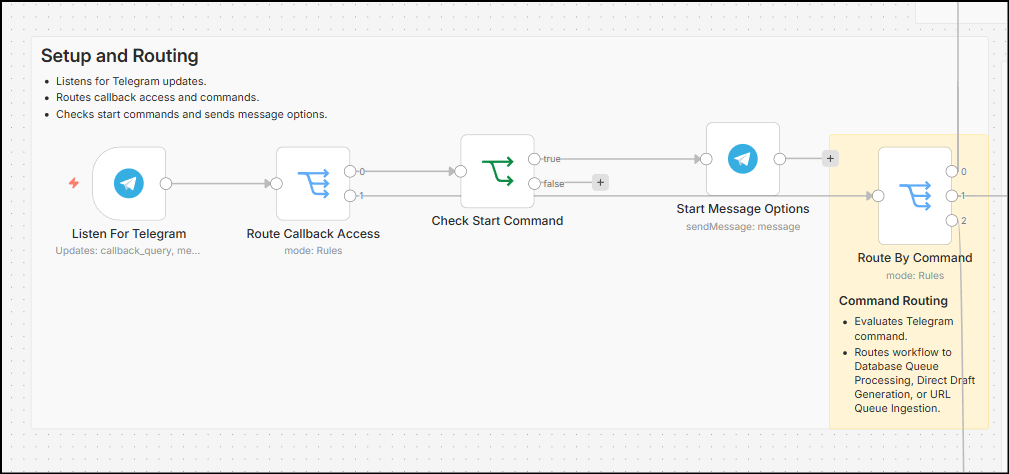
- Listen for telegram – This was the most reworked node. I got to know that a telegram bot only allows on a webhook. Which essentially means you have only one node that you can use as a trigger for starting a workflow and for receiving messages. This meant orchestrating workflow in a way that uses a complex routing or switching for reaching different parts of the workflow through a simple trigger.
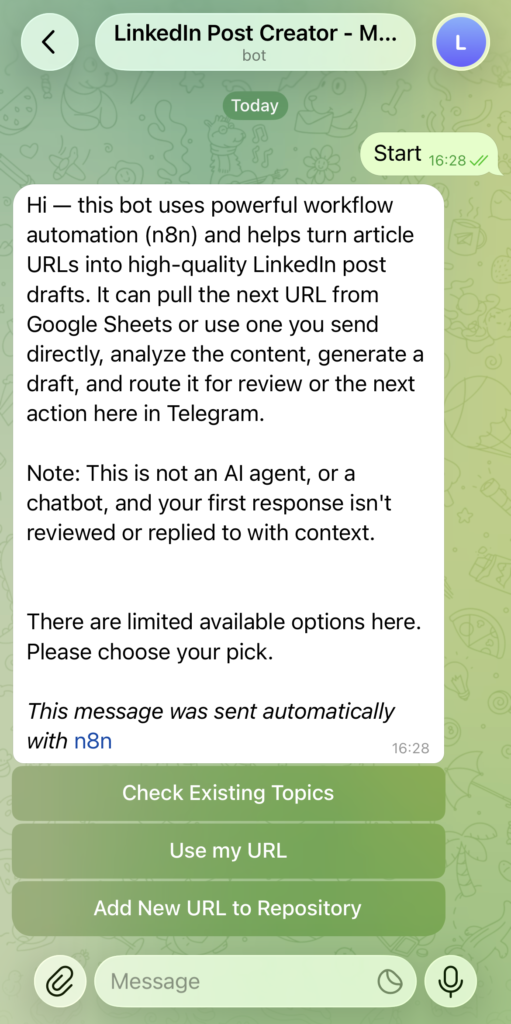
- Route callback access – This uses the switch node to either send a start message with all available callback options in telegram, or send the response to another switch, depending on what the response was in the listen for telegram node.
- The start message is orchestrated as an intro message with 3 simple options for the user.
Branch 1 – Database Queue Processing
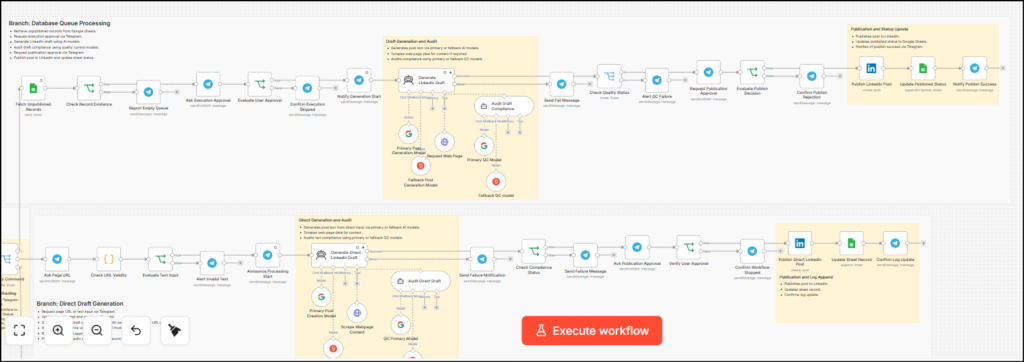
- The first initial set of nodes in this branch is for fetching the records in a Google sheet. From there, the row with the URL and the publish status set to “No” is picked.
- If there are no rows with URLs that have the status published set to “No”, an error message is sent to the Telegram chat. If a URL is found, it is sent to the chat for approval. Once approved, the URL from the Google sheet is sent to the AI Agent for further processing.
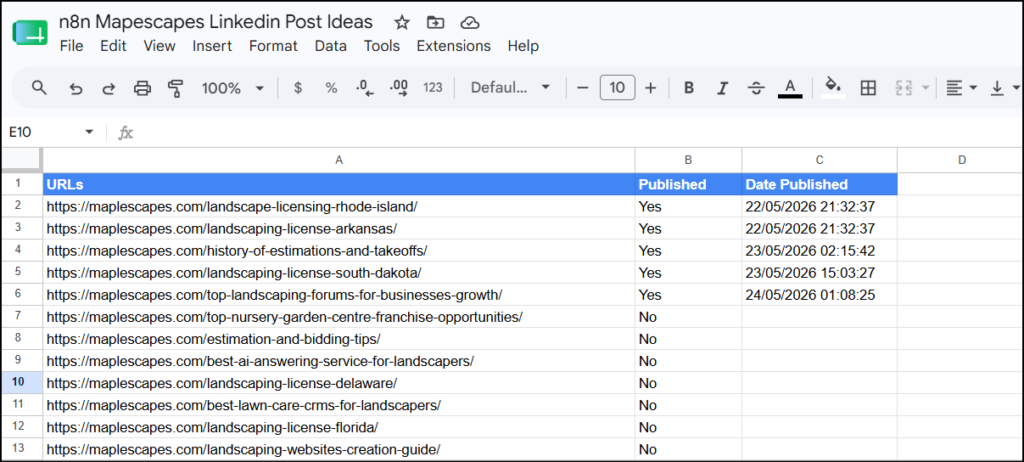
- The URL from this sheet goes to the AI agent, which is set up with strict prompts and augmented with an HTTP node, and a QC Agent connected to Google Gemini as main models and Groq as fallback models. The main agent receives the URL, uses instructions to fetch the content from the HTTP agent, and uses the instructions and the content from the page to create a draft. The draft is then sent to the QC agent, and after evaluation, rework is done if needed.
- The AI agent does not pass the second draft to the QC agent to save tokens and avoid too many request errors (429) or server timeouts (5XX).
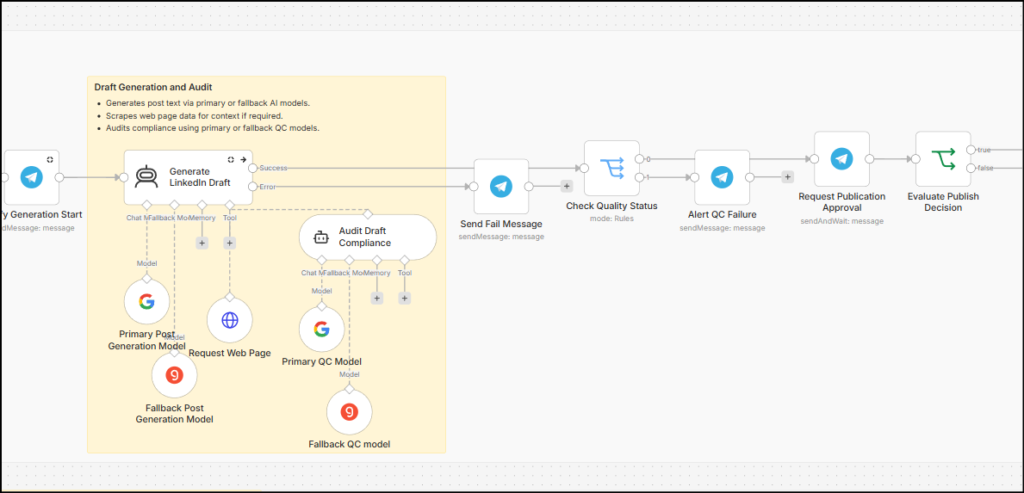
- If content generation fails due to any reason, such as HTTP fetch failure, low-quality output, or low-quality input, a message is sent back to the bot, and workflow stops there.
- Otherwise, if the QC passes, then the draft is sent to the human in the loop for review through a telegram message. The user can accept or reject the draft.
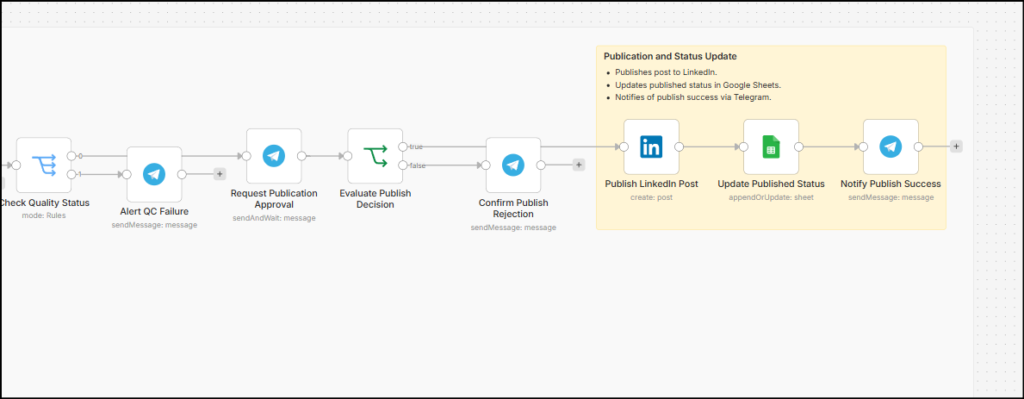
- If accepted, the draft is passed to the LinkedIn API node on an account that has the “Share on LinkedIn”, “Advertising API,” and “Sign In with LinkedIn using OpenID Connect” enabled on https://www.linkedin.com/developers/apps
- The row where the original URL was picked up, the publish status is updated to “Yes” along with the publish date, using a simple JS expression in the n8n node
{{ DateTime.fromISO($now).setZone('Asia/Kolkata').toFormat('dd/MM/yyyy HH:mm:ss') }}
Branch 2 – Direct Draft Generation
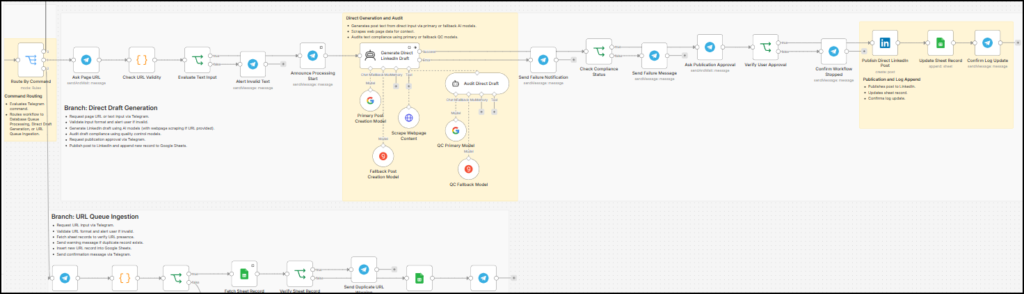
- This branch is very similar to the first branch, with only one crucial difference. The previous branch looked into an Excel sheet for unpublished topics; this branch directly asks the user for the topic (direct URL of the page). It then uses the same workflow, including the same instructions for the AI Agent and the QC agent for draft generation, approval, and posting.
- Another minor addition to this branch is a code node. It validates if the URL receied form the input is a proper URL. While it doesn’t do advanced checks, it still ensures the text is trimmed and checked against commonly known URL validity rules. It uses the following code:
const input = $input.first().json;
const message = String(input.data?.['Enter your URL'] || "").trim();

const is_url = /^(https?:\/\/)([a-z0-9]([a-z0-9-]*[a-z0-9])?\.)+[a-z]{2,}(\/[^\s]*)?$/i.test(message);

return [
  {
    json: {
      original_message: message,
      is_url
    }
  }
];
Branch 3 – URL Queue Ingestion
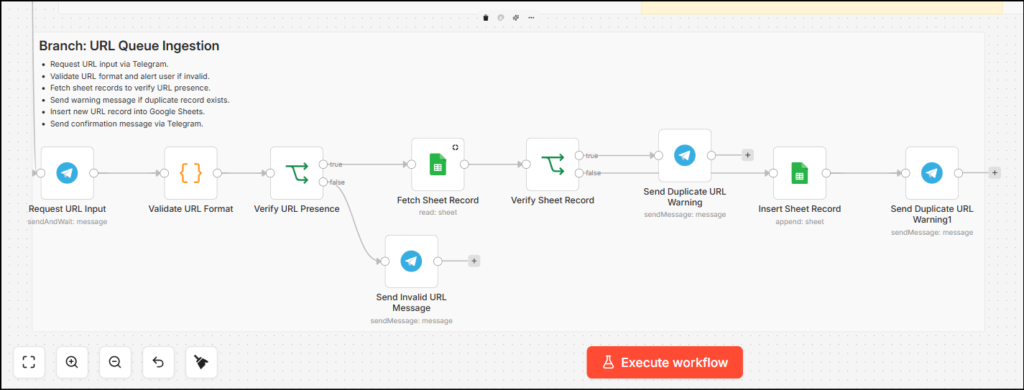
- The third branch is pretty simple. It ingests the URL given by the user.
- The code node, similar to the node in branch 2, performs a cursory validation on the input.
- The Google sheet is checked for any duplicates in the same sheet. If everything comes as validated, the new URL is added to the sheet with the publish status set as “No”. If there is a duplicate, an error notification is sent to the user in the form of a text message in the Telegram bot chat.
Your thoughts?
Let me know if you found this helpful. If you need a thing or two changed here, I’d be happy to do that – connect with me on LinkedIn or via email from the footer/about page and let me know what you need.