


For a recent enterprise-scale content audit, I needed a reliable method to identify content duplication. Due to many iterations of similar insights spanning across thousands of pages, there are a few signals that many sections of content were competing with each other on search, and overall, they were becoming repetitive to users consuming content on the website.
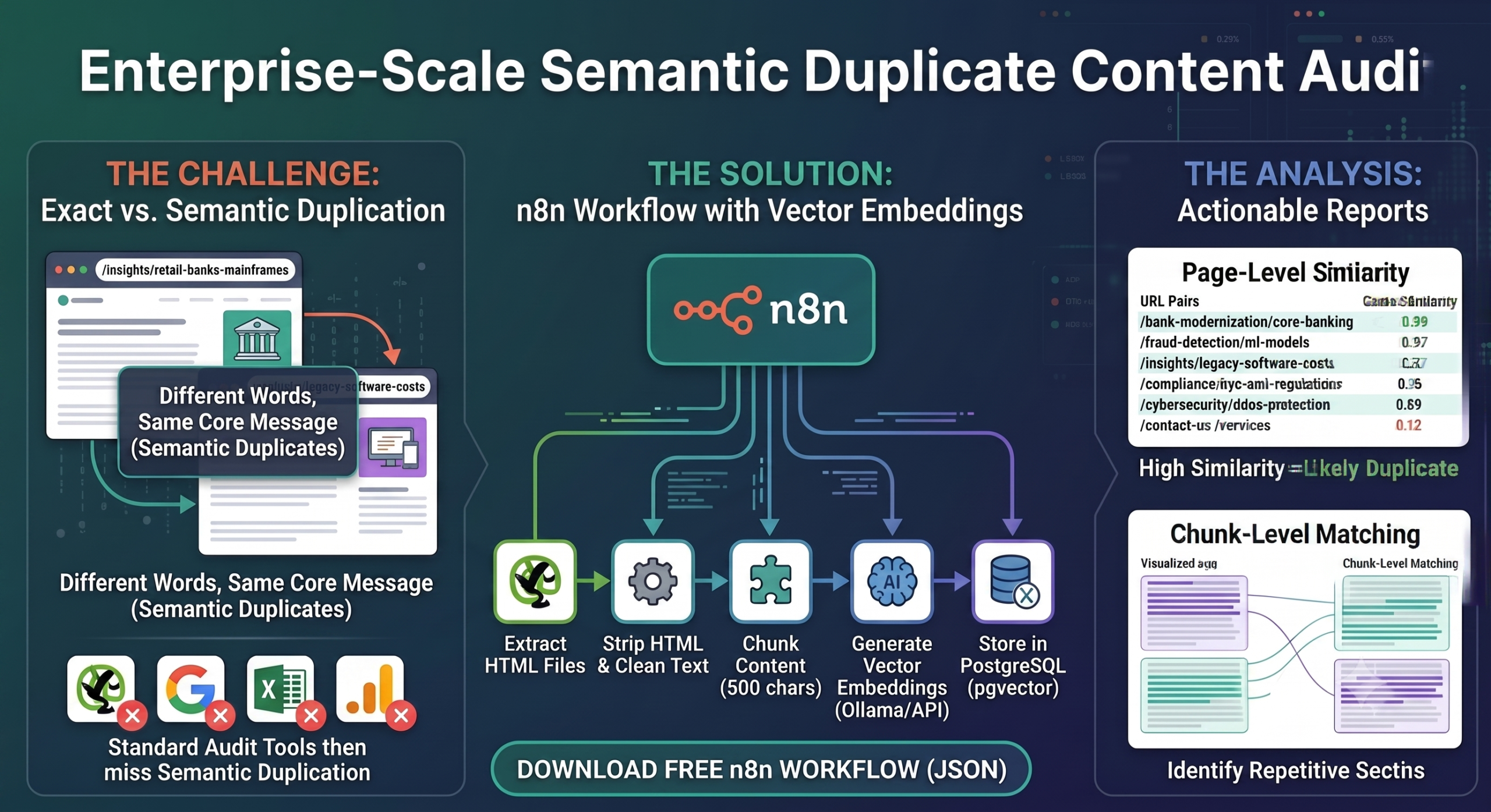
The issue here was not exact duplication (can be audited easily through Ahrefs, Screaming Frog, and Semrush audits); the issue was identifying semantic duplication across a large website.
Exact/Near duplicates: Strings are matched against each other within the same page or other pages to find nearly identical pages.
Semantic Duplicates: Content on a page that shares the same underlying core message or topic, even if it doesn’t share the same words.
Why semantic duplicates are a big problem
While semantic duplicates largely go unnoticed (no one has that 30,000-ft view, really!), they become a problem not so much for search engines as for users when they come across a thought-leadership-style article, read it, and understand it.
Then, when they move to another interesting article, they find the same insight just with different words. That really puts them off and erodes trust (which took real human capital and huge resources to build in the first place).
Thought leadership pieces are rare, and real pieces are hard to create. They are generally served with different wrappers and flavours to attract audiences facing similar problems in different situations. Because this is such a general practice, in an enterprise setting, this is what happens that creates an issue:
- The content pipeline is decentralised in bigger companies. Each website section/ URL path has its own team, and they independently publish content for their themes.
- A lot of content across ‘industries’ and ‘services’ verticals requires similar topics. This is fine, as for organic search, search engines can understand the overall topic and intent and personalise results for users.
- But the thought leadership articles created for these verticals are very prone to accidental semantic duplication. Example:
/insights/why-retail-banks-must-retire-their-core-banking-mainframes/insights/the-hidden-cost-of-monolithic-legacy-software
- If the content is not different enough (in terms of a narrative, intent, use case, or personalisation), then it’s an issue for both the search engine and users.
References from publications:
- https://pubmed.ncbi.nlm.nih.gov/39600261/
- https://everything-pr.com/why-most-b2b-thought-leadership-fails-before-it-s-published
Inquisitiveness led to a solution
I put in some time to find solutions from existing developer communities, but there was no production-grade solution except one – the new vector embedding functionality in Screaming Frog! Apart from this, I searched for hours and hours, but there is no viable way to actually do it with my constraints – non-cloud service (data remains local), analysis for a very large set of pages (5000+), and the ability to manipulate databases and fine-tune the results.
Even with Screaming Frog’s new functionality (released in v22.0), I could use vector embeddings, but I couldn’t make a few minor changes to the algorithm to fine-tune the results in my favor. For example, rather than embedding page text with HTML tags, I want to use only text. Rather than just comparing full pages, I wanted to compare sections of a page to other sections of other pages (computationally expensive, but it aligns with the requirement).
Swoops in n8n with amazing flexibility – Once I brainstormed with Gemini (3.1 Pro, extended thinking, multiple retries), I found out how this setup can be created with n8n, a vector embedding model (or API), a vector database, and a few other simple nodes.
Note: Screaming Frog or a similar crawler is still required to download page HTML files (rendered or source text if it’s not JS-heavy); the entire process of finding semantic duplicates is within n8n.
The workflow (solution)
- Extract HTML files using Screaming Frog or any other crawler (Siteone crawler, Librecrawl) and save them in a place (ideally, the cloud).
- Fetch the files in batches, strip them of HTML and CSS tags/attributes so that only the text remains, and store the page content in a data table.
- Break each page’s content into chunks. Ideally, in 500 characters with a 50-character overall.
- Create vector embeddings from the chunks. You can use a free AI model, mxbai-embed-large, or go with an even better one, Qwen3-Embedding-4B (if you have different languages). You can also use the Google embedding model 2 API if your content is in different formats, such as Images, Videos, and PDFs.
- Store vector embeddings in a vector database. I used the open-source pgvector (PostgreSQL) for this.
- Create an HNSW index using the approximate nearest neighbour (ANN) search algorithm to create a multi-layer graph network.
- Use this HNSW index to find the closest matches of one chunk with others. For this, use cosine similarity to find all the nearest matches of the chunks.
- Do database manipulation to generate a report that matches chunks on one page with chunks on other pages (exclude the self page). This becomes your chunk/section-level duplicate report.
- Calculate the centroid embedding for a page-level report (average of all its chunk embeddings) and store it in a separate table. Create another HNSW index and calculate cosine similarity by comparing each centroid to all other page centroids. This becomes a page-level duplicate report.
Download the workflow
Download your workflow here (JSON File). You can upload this file to your instance or copy and paste the code directly into your workspace in n8n.
This workflow is also published under my profile on n8n’s official template library.
Please note that you’ll have to use your own credentials for API services where required and make some tweaks based on the services you want to use and the output you want to get. If you configure your accounts based on existing nodes, the out-of-the-box configurations should be good enough for your analysis.
Results analysis (be strategic)
You can analyse results by getting the CSV and putting some filters on it from the workflow. Before you do that, though, you need to keep a few things in mind for context:
- Have you pushed 5000 random pages to the workflow? The results might get polluted with duplicates that were intentional. For example, language pages or canonicalised pages with similar text would come out as duplicates. Local location pages or pages with low word count, such as contact pages, might come as duplicates as well. If you do want to analyse those, then go ahead, but otherwise leave them out of the input.
- If you’re at an enterprise firm with multiple vertical or industry sections, scope it to one section at a time. Run
/insights/retail/and/insights/financial-services/Separately, then together, and compare what surfaces. - After running the report, the analysis is 30% of the work. You will need your judgment, and you will need to look at both semantically duplicate pages in your browser to see the duplicate content. Additionally, you can use this matrix for decision-making:
- Consolidate: Merge pages making the same core argument into the higher-performing URL and 301 redirect the other.
- Differentiate: Rewrite overlapping pages that have distinct purposes to clearly target separate audiences or use cases.
- Do nothing: Ignore matches caused by shared structural boilerplate, such as legal disclaimers, standard definitions, or CTAs.
- Prioritise: Address URL pairs showing overlapping query impressions in GSC first, as this confirms keyword cannibalisation.
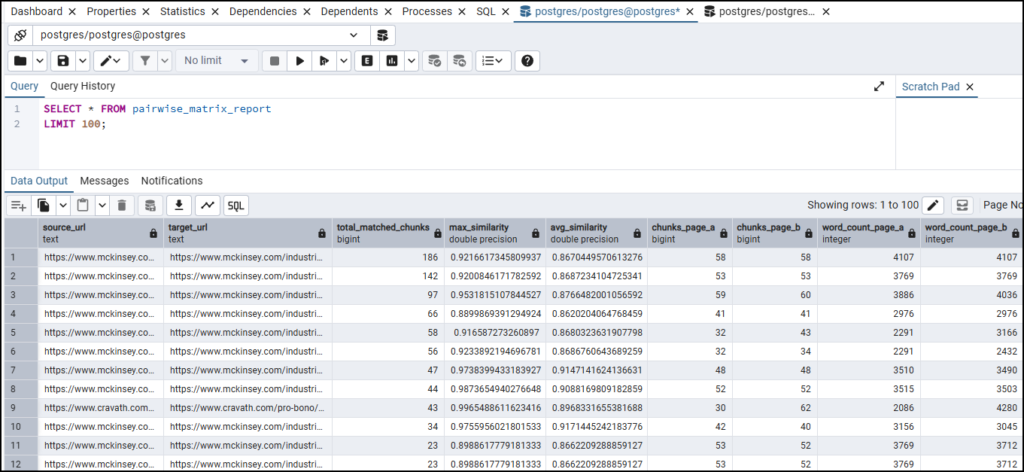
The Chunk similarity report looks like this:
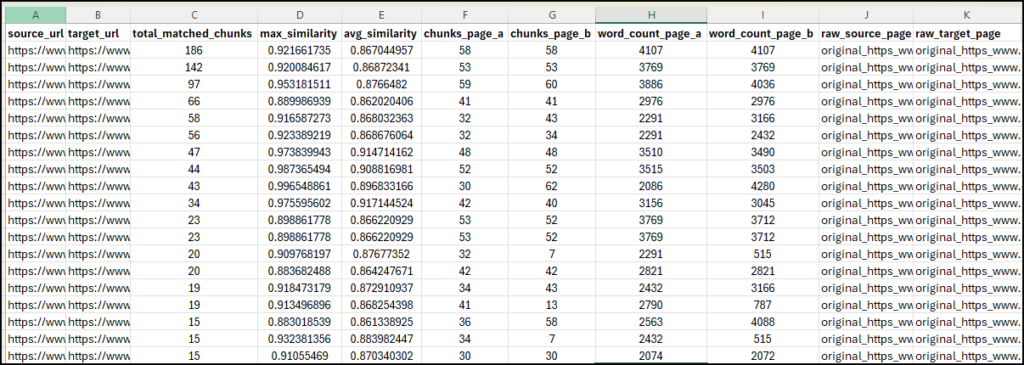
There are a few columns here, all created to help you find the most relevant pairs for your duplicate content audit. Sort by total_matched_chunks descending first, then filter to rows where avg_similarity is above 0.90 or 0.95. The resultant pages will be the pages with multiple sections saying the same thing at a high level of similarity. Everything below this threshold is worth a secondary look but is less urgent.
- total_matched_chunks: how many sections across the two pages are semantically similar. A high number here, combined with a high average similarity, is your low-hanging fruit in terms of finding semantic duplicate content across a site.
- max_similarity — the highest similarity score between any single pair of chunks from the two pages. A high max but low total_matched_chunks usually means the two pages share one paragraph or section almost verbatim. It could be a CTA, a disclaimer, a definition — but they are otherwise different.
- word_count_page_a / word_count_page_b: useful for context. A 3,000-word article and a 300-word article that match on five chunks are a very different situation compared to two 3,000-word articles matching on the same five chunks.
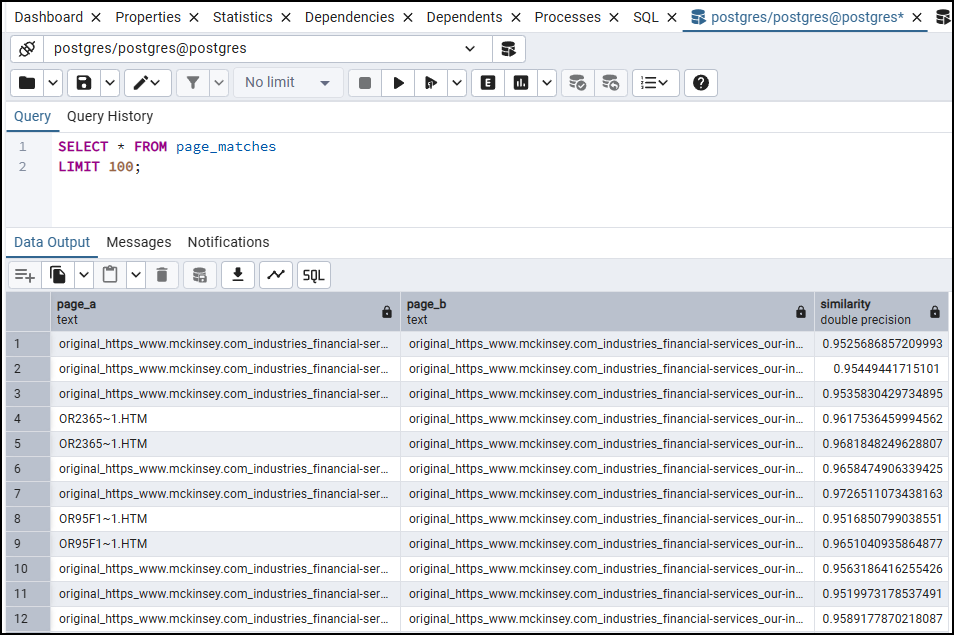
The page-level similarity report looks like this:
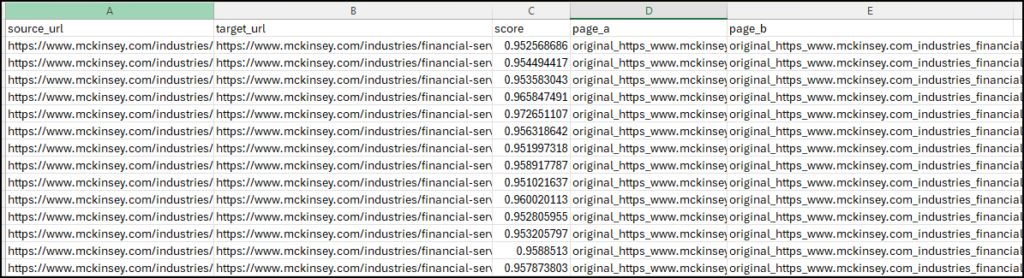
This report gives you a single centroid-based similarity score for each page pair, calculated by comparing the average of all chunk embeddings from one page against the average from the other.
A similarity score above 0.95 here (cosine distance below 0.05, which is the default threshold used in this workflow) is a strong signal that two pages, on the whole, are covering the same ground. Use this report to identify which pairs to investigate, then go back to the chunk-level report to understand exactly where the overlap sits.
Requirements:
- Working instance of n8n, either self-hosted or on the cloud. Remember, this workflow can be computationally expensive.
- Google Drive API (with OAuth setup in the n8n credentials section)
- Ollama (for open-source models) or any Embedding model API
- PostgreSQL with PGVector or any other vector database
- PgAdmin (for PostgreSQL) or your interface to access database tables via SQL for troubleshooting (optional).
Workflow architecture (+working explained)
The inner workings of this workflow are explained in this section. Read this if you’re inquisitive about how all of this works or if you want to tweak it to make the configuration work for you better.
Staging setup (Ingestion and storage)
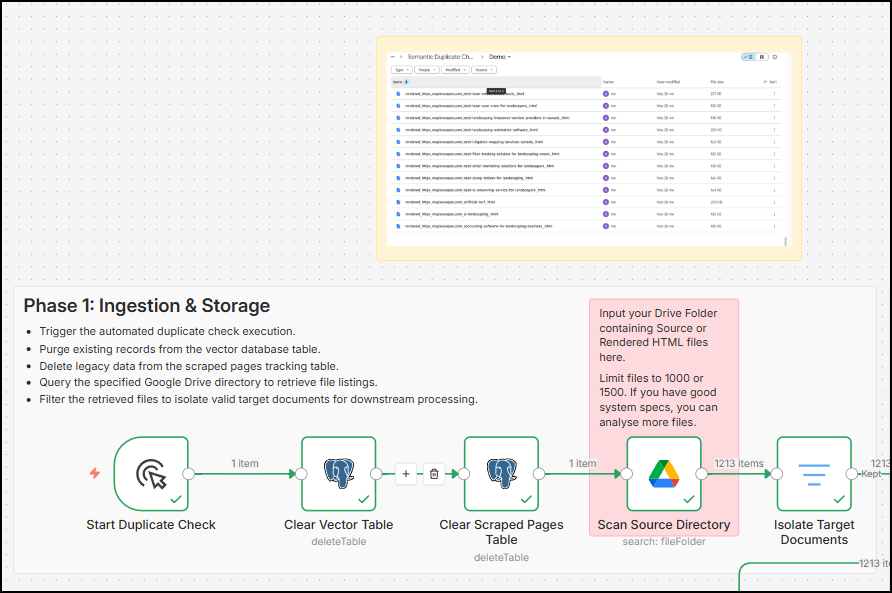
Phase 1 does all of these things:
- It clears the n8n_vectors table. This is done to ensure there is no existing data in the tables. The table risks having this existing data because if you have run the workflow even once on your pc, these tables get created, and the vector embeddings are stored in the table. This pollutes your new data and the similarity scores take a hit.
- Similar to clearing the n8n_vectors table, the scraped_pages table is also cleared. This table is used to store the metadata of the file and the cleaned text from any HTML page. Cleared tables start your workflow fresh.
- Scan source directory: This is the main node of this phase. Here, you can add a folder URL of a Google Drive instance, where your source or rendered HTML files are stored.
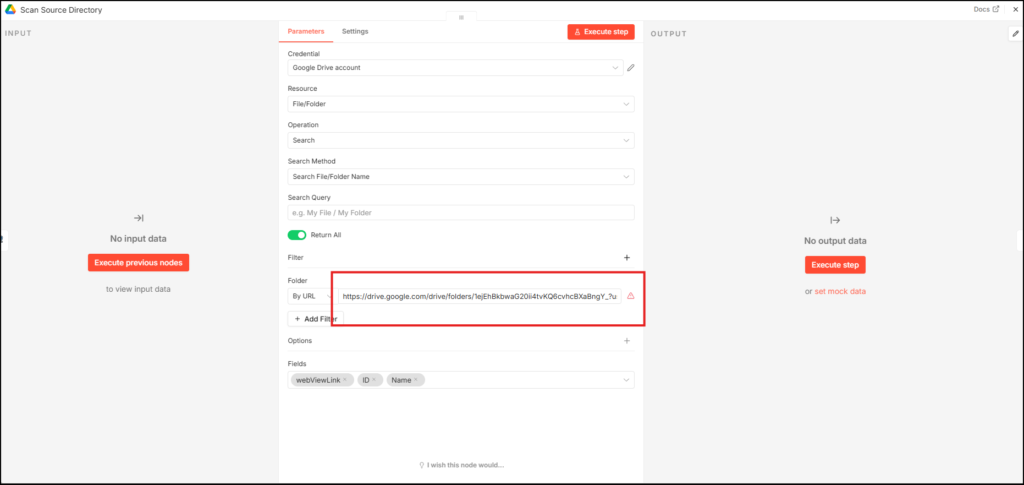
- Once you add the URL where the source files are stored, it will search the folder and fetch a few details, such as the file ID, among other stuff, which would be needed in the next phase.
Data preparation (content extraction and storage)
While the first phase was for preliminary data preparations, phase 2 goes more into analysing each file, removing HTML elements from a page to get clean text, and then storing the page text in a nice and clean file along with other file details such as file name, file ID, and file URL.
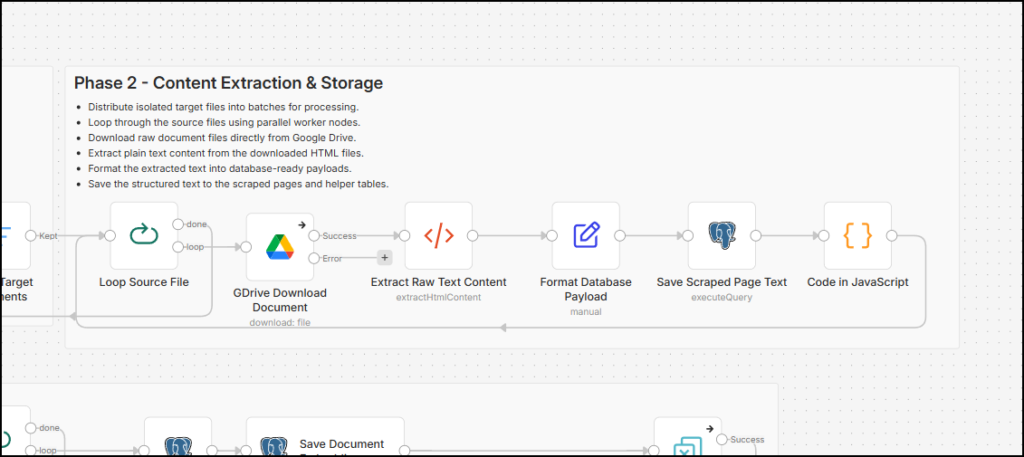
Phase 2 does all of these things:
- Phase 2 starts with a loop taking in 10 file IDs in a batch. It feeds the file ID to a Google Drive file download node. This searches the authenticated Google account’s drive with the ID and then downloads it.
- The next step is stripping all HTML elements from the file. Because the file is essentially a download of an HTML page, this node takes in the body tag content and strips all data based on selectors. Below is the list of selectors we’ve added to skip so that most website pages (built in Adobe AEM, WordPress, and other major CMS) strip the HTML noise in the file.
img, header, footer, nav, aside, menu, dialog, template, script, style, noscript, iframe, svg, canvas, map, object, embed, audio, video, picture, form, button, input, select, textarea, details, [aria-hidden="true"], [hidden], [role="dialog"], [role="alert"], [role="banner"], [role="navigation"], [role="contentinfo"], [role="menu"], [role="menubar"], [role="search"], #onetrust-consent-sdk, #cc-window, #usercentrics-root, .cc-window, .cookie-banner, .cookie-consent, .cookie-notice, [id^="cookie-"], [class^="cookie-"], [id^="consent"], [class^="consent"], .modal, .modal-dialog, .modal-content, .modal-overlay, .popup, .popup-container, .lightbox, .overlay, .ad-slot, .adsbygoogle, [id^="div-gpt-ad"], .taboola-container, .outbrain, .advertisement, [class^="ad-container"], [class^="ad-wrapper"], [class^="sponsor"], .share-buttons, .social-share, .a2a_kit, [class^="share-"], [class^="social-"], #comments, .comments-area, .disqus-thread, .widget, .widget-area, #secondary, #sidebar, .sidebar, .moduletable, .toast, .snackbar, .spinner, .loader, .cmp-share-bar, .cmp-video__cookie-fallback, .cmp-feedback-banner, #target-recommendations-bottom, .cmp-promo-container--single-row-multi-columns, .cmp-skip-navigation-link, .cmp-header__welcome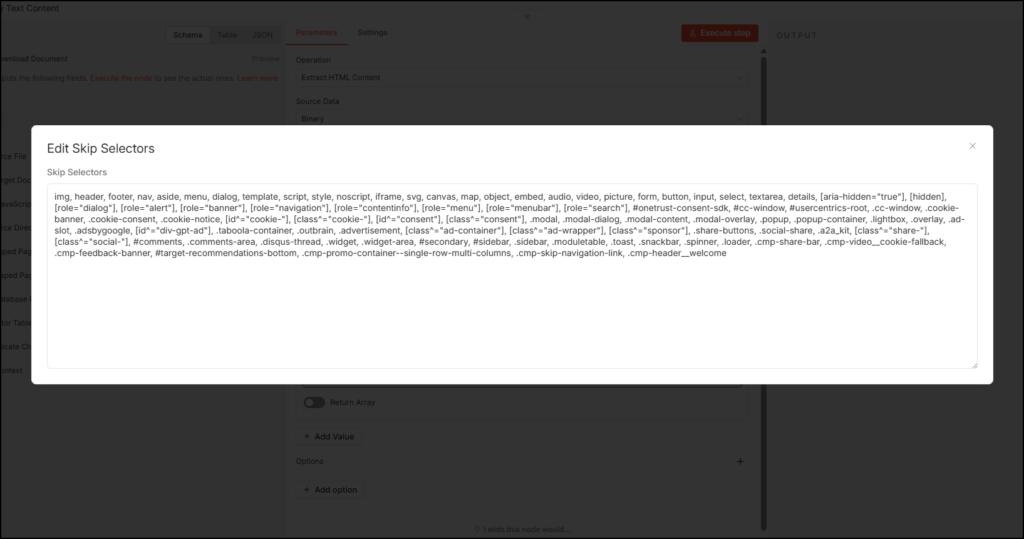
- This gives a very clean page text from the HTML source easily. Because there are still some artifacts remaining, such as hyperlinks or image URLs, we’ve used a simple format node to format incoming cleaned page text data to make it even cleaner.
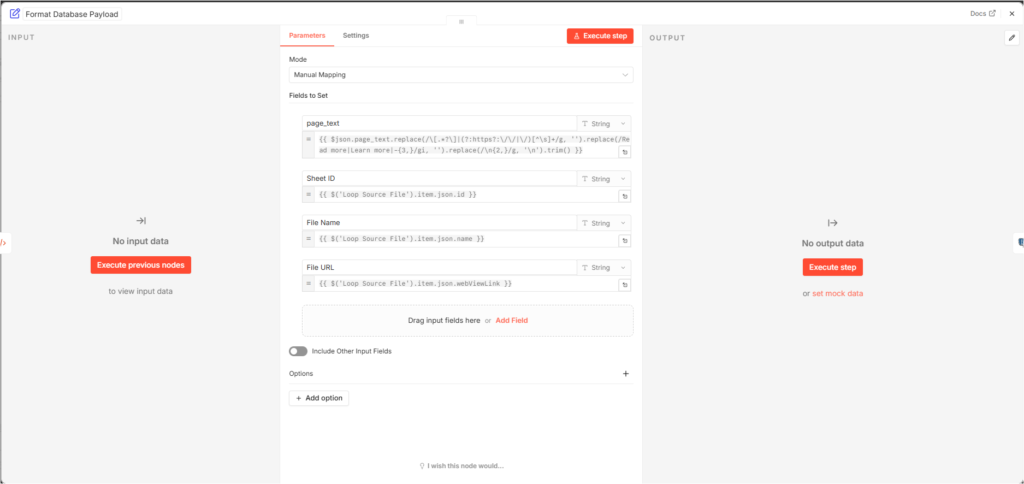
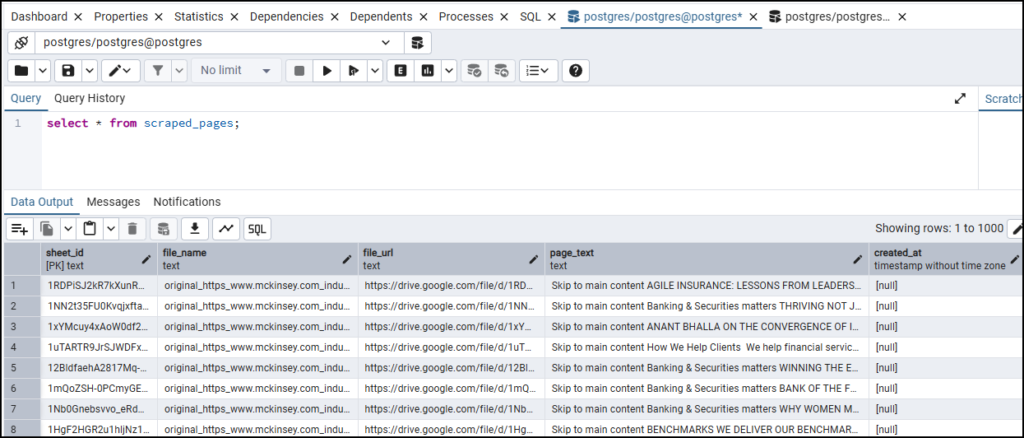
- What’s next is a simple SQL operation. Right now, the data you have is file IDs, file URLs, file names and cleaned page text. The Postgres node performs a simple SQL operation to create a table named scraped_pages and inputs this information into this table. Below is the SQL code used here for this purpose.
CREATE TABLE IF NOT EXISTS scraped_pages (
  sheet_id text PRIMARY KEY,
  file_name text,
  file_url text,
  page_text text
);

INSERT INTO scraped_pages (
  sheet_id,
  file_name,
  file_url,
  page_text
)
VALUES (
  $1,
  $2,
  $3,
  $4
)
ON CONFLICT (sheet_id)
DO UPDATE SET
  file_name = EXCLUDED.file_name,
  file_url = EXCLUDED.file_url,
page_text = EXCLUDED.page_text;- Please note that, as per best practices, the variable data received from previous nodes is injected into this code with each run. So each corresponding item, such as $1, is replaced with the file ID (coded as Sheet ID).
- $1 – Sheet ID
- $2 – File Name
- $3 – File URL
- $4 – page_text
- Now, the next node is a simple JavaScript code node. This node outputs the sheet IDs. This is done to stay compliant with the loop node rules. Each loop node needs to receive an equal number of inputs in any form that it starts with, so that it can run the iterations based on the total number of items it receives.
- Here is how the scraped_pages table looks:
Footnotes:
- We use Google Drive to search for file IDs and download files from Drive instead of using local uploads, so that this workflow can be adopted widely. Uploading local files might present a challenge for cloud-hosted or self-hosted users with containerised versions. The usage of the drive makes it easier to search for files uploaded to a folder and download them for processing. Note that this takes some time, so if you need a faster process, you can tweak the nodes to receive files from local storage.
- We need to clean data from scraped HTML pages because HTML and CSS tags introduce a lot of noise in the content. What you need is only the page text (and boilerplate content removed as well) to create chunks of the page text and compare those chunks with each other. If you have a lot of boilerplate content present on every page, those chunks will also cause 100% matching and pollute the overall data.
- The loop here is added to split the file downloads, cleaning, and storing in a table in batches because each file download takes some time, and the drive download file node becomes a bottleneck if it is left to download 100 files at once.
- If you’re also using the same setup and using PostgreSQL, you can download PG Admin software for the desktop and query your tables from a GUI there.
Creating vector embeddings (embedding generation and chunking)
Now that you have the data prepped for duplicate checking, content based on meaning rather than words, you need to map the sentences or chunks of content to mathematical vectors. Phase 3 of this workflow is all about vector embedding generation and storing these vectors in a relevant, compatible table using SQL.
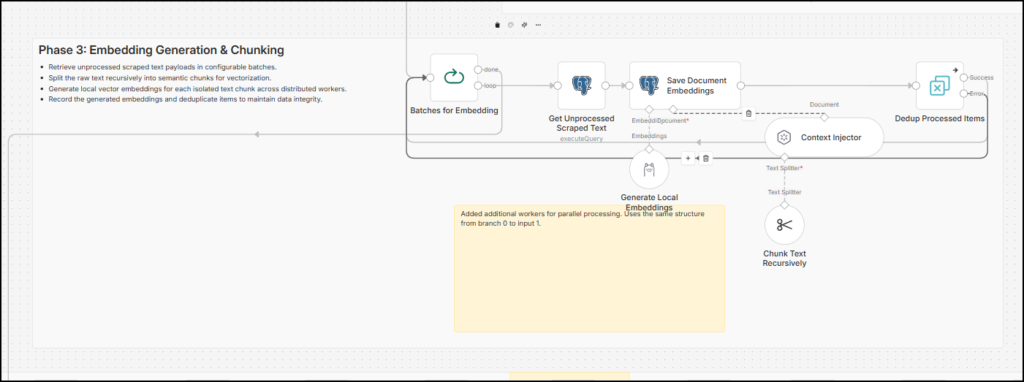
Here is how this section of the workflow works:
- This phase also starts with the loop that processes inputs such as file IDs (references to the Sheet ID). The first node after the loop just fetches page text and other details from the scraped_pages table created in the previous phase and inputs them to the next node.
- The next node uses an AI model (Local or API based) to convert the scraped text into vector embeddings. I am using
mxbai-embed-largevia Ollama. Another node attached to it is the context injector. This node uses a split node to chunk text based on our inputs. I have put it at 500 characters with 50 characters overlap, but you can change it depending on the type of content you are auditing. - These four nodes together chunk the page text and create vector embeddings using an open-source embedding model. In addition, the context injector node helps add metadata to the vector embedding rows, such as file ID, file name, and file URL.
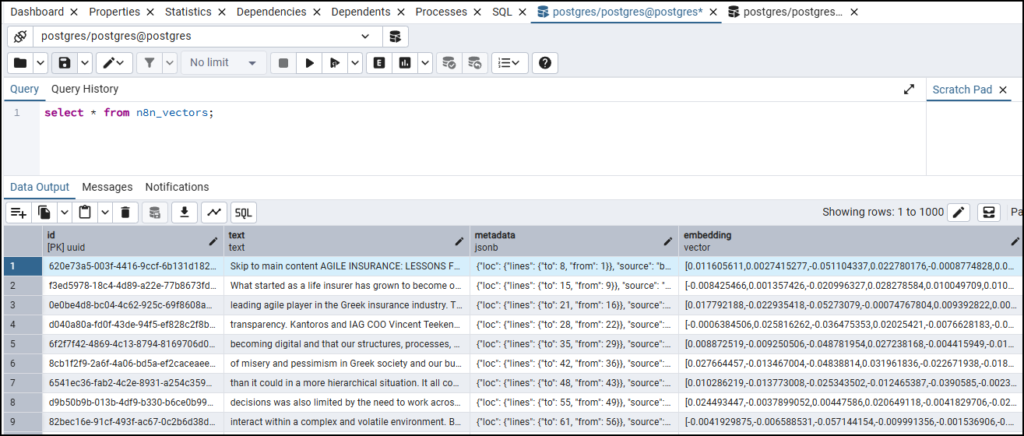
- This is how the n8n_vectors table looks:
Notes:
- Use Qwen or other models if you’re auditing an enterprise site with content in mixed languages.
mxbai-embed-largeIt is an awesome model, but it has a token limit of 512 and works best with the English language. Additionally, since it only supports text, you can use other models to have a more varied set of inputs, such as PDFs, images, and more. - I used PostgreSQL as it was open source, and PG Vector as a capability that allowed me to store vector embeddings and create HNSW indexes for later processing. You can use other databases as you deem fit.
Analyse semantic duplicates (similarity analysis and export)
This is the last and one of the most important phases of the workflow. Phase 4 does a whole lot of database manipulation, runs the Approximate Nearest Neighbour (ANN) search inside SQL using the Hierarchical Navigable Small World (HNSW) indexes and queries data for a CSV file export.
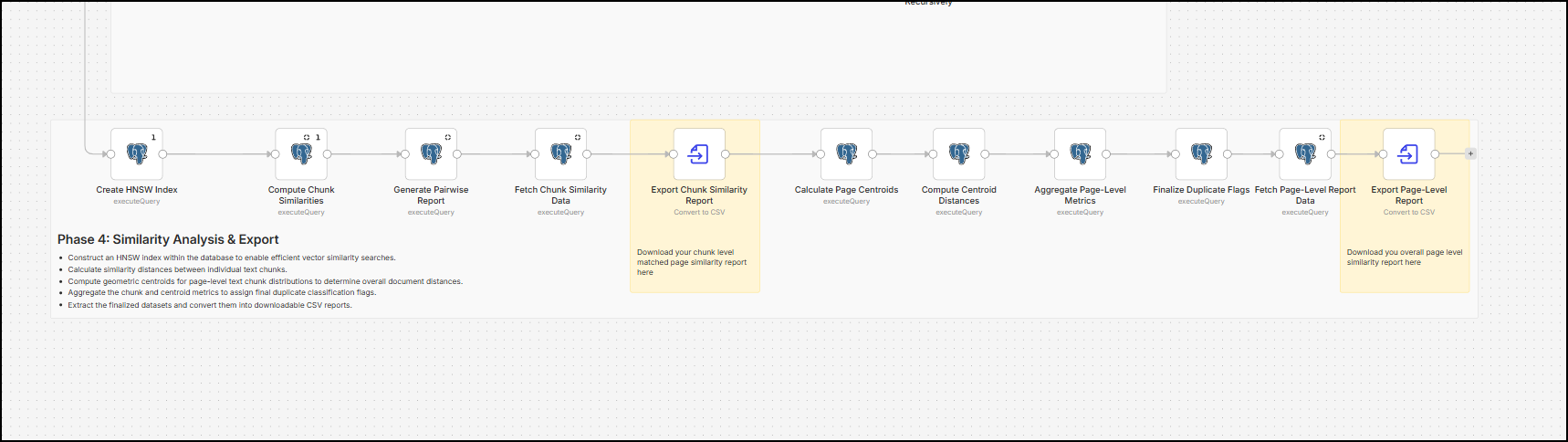
This phase performs two major operations:
- Create an HNSW index, calculate chunk similarities (cosine distance) using that HNSW index, aggregate chunk matches by source page and target page and fetch and parse all of the data in a nice and clean CSV file.
- Calculates each page’s geometric mean vector, creates another HNSW index for comparing page centroids, uses the cosine distance to find the most similar pages, and parses the report to create a CSV file.
Here is some SQL code you can use for your setup:
DO $$
DECLARE
    idx_record RECORD;
BEGIN
    -- 1. Safely find ALL matching indexes specifically in the public schema
    FOR idx_record IN
        SELECT indexname
        FROM pg_indexes
        WHERE schemaname = 'public'
        AND tablename = 'n8n_vectors'
        AND indexname LIKE 'n8n_vectors_embedding_idx%'
    LOOP
        -- 2. Drop ALL of them (it is faster to alter a table without indexes attached)
        EXECUTE 'DROP INDEX IF EXISTS public.' || quote_ident(idx_record.indexname);
    END LOOP;
END $$;

-- 3. Apply the 1024-dimension constraint
-- Warning: If existing rows have vectors that are NOT 1024 dimensions, this will fail.
ALTER TABLE public.n8n_vectors ALTER COLUMN embedding TYPE vector(1024);

-- 4. Create the single, fresh HNSW index safely
CREATE INDEX IF NOT EXISTS n8n_vectors_embedding_idx
ON public.n8n_vectors USING hnsw (embedding vector_cosine_ops);BEGIN;
-- 1. Expand the index search buffer (Default is 40).
-- Must be slightly higher than your LIMIT to ensure accurate results.
SET LOCAL hnsw.ef_search = 550;
-- 2. Force Postgres to trust the index.
-- This stops the optimizer from flipping to a full-table scan due to the high limit.
SET LOCAL enable_seqscan = off;
-- 3. Execute the table creation
DROP TABLE IF EXISTS chunk_matches;
CREATE TABLE chunk_matches AS
SELECT
a.metadata->>'file_name' AS page_a,
b.metadata->>'file_name' AS page_b,
a.id AS chunk_a_id,
b.id AS chunk_b_id,
1 - (a.embedding <=> b.embedding) AS similarity
FROM n8n_vectors a
CROSS JOIN LATERAL (
SELECT id, embedding, metadata
FROM n8n_vectors
WHERE id != a.id
AND metadata->>'file_name' > a.metadata->>'file_name'
ORDER BY embedding <=> a.embedding
LIMIT 500
) b
WHERE (a.embedding <=> b.embedding) < 0.15;
COMMIT;DROP TABLE IF EXISTS pairwise_matrix_report;
CREATE TABLE pairwise_matrix_report AS
WITH best_matches AS (
SELECT
page_a,
page_b,
chunk_a_id,
similarity
FROM (
SELECT
page_a,
page_b,
chunk_a_id,
similarity,
ROW_NUMBER() OVER (
PARTITION BY page_a, page_b, chunk_a_id
ORDER BY similarity DESC
) AS rn
FROM chunk_matches
WHERE similarity < 1
AND page_a < page_b
) ranked
WHERE rn = 1
),
aggregated_pairs AS (
SELECT
page_a AS source_page,
page_b AS target_page,
COUNT(*) AS total_matched_chunks,
MAX(similarity) AS max_similarity,
AVG(similarity) AS avg_similarity
FROM best_matches
GROUP BY page_a, page_b
HAVING COUNT(*) >= 2
),
page_metrics AS (
SELECT
v.metadata->>'file_name' AS raw_page_name,
COUNT(*) AS total_page_chunks
FROM n8n_vectors v
GROUP BY v.metadata->>'file_name'
)
SELECT
-- Cleaned Destination URLs
'https://' || REPLACE(
REGEXP_REPLACE(
REGEXP_REPLACE(
ap.source_page,
'^(rendered|original)_https_',
''
),
'\.html$',
''
),
'_',
'/'
) AS source_url,
'https://' || REPLACE(
REGEXP_REPLACE(
REGEXP_REPLACE(
ap.target_page,
'^(rendered|original)_https_',
''
),
'\.html$',
''
),
'_',
'/'
) AS target_url,
-- Chunk Match Metrics
ap.total_matched_chunks,
ap.max_similarity,
ap.avg_similarity,
-- Page structural context
ma.total_page_chunks AS chunks_page_a,
mb.total_page_chunks AS chunks_page_b,
-- Robust Word Count Calculation
COALESCE(
array_length(regexp_split_to_array(trim(sa.page_text), '\s+'), 1),
0
) AS word_count_page_a,
COALESCE(
array_length(regexp_split_to_array(trim(sb.page_text), '\s+'), 1),
0
) AS word_count_page_b,
-- Original Ingestion Strings appended at the end
ap.source_page AS raw_source_page,
ap.target_page AS raw_target_page
FROM aggregated_pairs ap
-- Join for Chunk Counts
LEFT JOIN page_metrics ma
ON ap.source_page = ma.raw_page_name
LEFT JOIN page_metrics mb
ON ap.target_page = mb.raw_page_name
-- Join for Word Counts
LEFT JOIN scraped_pages sa
ON ap.source_page = sa.file_name
LEFT JOIN scraped_pages sb
ON ap.target_page = sb.file_name
ORDER BY
ap.total_matched_chunks DESC;You can download the full workflow for free and get other SQL code directly from the nodes.
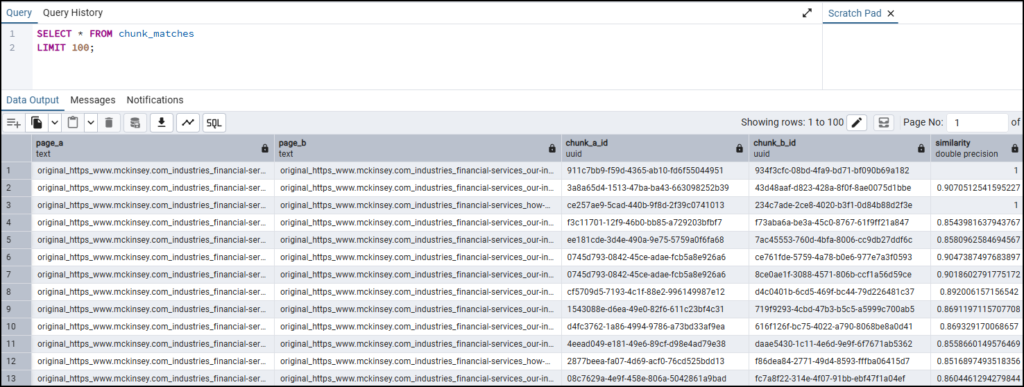
Here is what the chunk_matches table looks like:
Here is the pairwise_matrix_report. Note that the other metrics (calculated ad hoc through SQL codes) help in understanding the report, filtering and finding close duplicates.
Here is what the page_matches table looks like. This data is helpful in getting the overall page-wise similarity score, based on centroid calculations.
Limitations and your enhancements
I have spent hundreds of hours creating this workflow from scratch because there wasn’t anything like it on the open internet. I didn’t code everything myself and used Gemini 3.1 Pro to do it, but still, it took a massive number of retries, usage limit resets, and a number of iterations to make it barely work. For now, the workflow achieves its purpose. It finds semantic duplicates between pages (on a page level and page section level) on a website.
I would love for you to make this workflow yours, use it for real impact and enhance it even further. Based on this train of thought, here are a few limitations and a few potential enhancements for this workflow:
- Physical system memory
mxbai-embed-largeRunning through Ollama is free and private, but embedding generation speed depends entirely on your hardware. The more system memory you have, the more data you can process in batches in the loop node. - Similarity threshold and boilerplate content
The cosine distance used in this workflow is 0.15 for chunk-level matching. And 0.05 (similarity above 95%) of the threshold is used for page-level centroid matching. This is only the starting point. Once you have the data, and especially if your data has more noise, you might need to tweak these thresholds for better matching. - This workflow needs HTML files to extract text
This workflow doesn’t crawl a website or fetch pages by entering a URL. You need to download HTML files (rendered or source) for consumption. - Use parallel processing and Cloud APIs
Two sub-processes take the most time:- Downloading HTML files from Google Drive
- Creating vector embeddings
If you can use parallel processing in n8n and execute these sub-processes in parallel, the process will be done much faster. Additionally, if you can use cloud APIs for embedding, it may save some you some processing time as well.
- Use efficient SQL queries
Since I am from a non-tech background and not a coder, I used a mix of Gemini, Perplexity and Claude to create SQL code for this workflow. If you’re better at it, you can run computationally efficient queries that would help you achieve better results with less computational expense and time.
Your thoughts?
Let me know if you found this helpful. If you need a thing or two changed here, I’d be happy to do that – connect with me on LinkedIn or via email from the footer/about page and let me know what you need.