




I recently published a workflow that helps you extract URLs from a single sitmap in one go. The workflow creates a CSV file for all the URLs mentioned in the source sitemap and lets the user download the CSV file right from the chat interface.
It was helpful for at least one person, and they asked me on LinkedIn to create a workflow that would help them download those CSV files in bulk. So here you go.
I researched and found that there is no proper tool that is relevant for this job. You can’t just put a few URLs and get multiple CSV files together.
The idea here is simple: Use a workflow or a tool like a workflow that helps you get URLs from multiple sitemap files together without having to worry about hallucinations from AI, blacklisted online tools on your work laptop, and ad-ridden online tools that ultimately are a hassle to work with for large files.
The solution was simple – run the previous workflow in a loop – but architecture-wise, it took a little bit of time to figure that out. Also, I wanted to improve my previous workflow (Kaizen rules!), so I added a few enhancements here and there and made the process more robust.
Extract All URLs from Multiple Sitemap XMLs Using n8n
Creating this workflow took some thinking, but what it actually does is:
- On input, validates whether the URL ends with .xml (since most non-compressed sitemaps end with .xml in the URL) and whether the input URLs exceed 10.
- Stores the input URL to provide the user a summary – number of OK URLs, and other invalid URLs with status code, e.g., 404.
- Runs a loop to verify each URL again and check for sitemap indexes. Sitemap index URLs are isolated and fed back into the chat to let the user know they’ve entered a sitemap index
- Successful URLs are then fetched and converted to JSON into an array.
- JSON data is then converted to CSV and uploaded to a temporary file hosting service. The URL to download the CSV is sent to the chat interface for each URL as the loop runs.
Download The Workflow File Here
You can also copy and paste this JSON code directly into your n8n instance. (click to expand)
{
"name": "Extract Bulk Sitemaps to CSV via Chat",
"nodes": [
{
"parameters": {
"content": "### 🔍 Parse & Validate Input\n\nIntercepts the raw chat message to extract and validate the provided URLs. This ensures the workflow only attempts to process properly formatted links, preventing unnecessary errors downstream.\n\n**Configuration:**\n* **Node Type:** Code / Edit Fields\n* **Setup:** Parses the input text into an array of URLs and flags any invalid entries.",
"height": 264,
"width": 320,
"color": 7
},
"id": "b78af31e-fe23-446a-b3a7-cca24c3a6aba",
"name": "Sticky Note",
"type": "n8n-nodes-base.stickyNote",
"typeVersion": 1,
"position": [
-1456,
752
]
},
{
"parameters": {
"content": "### 💬 When Chat Message Received\n\nActs as the entry point for the bulk workflow. It listens for the user to submit a text message containing one or more sitemap URLs, passing the raw input forward for validation.\n\n**Configuration:**\n* **Node Type:** Chat Trigger\n* **Setup:** Listens for the `chatInput` string from the user.",
"height": 264,
"width": 320,
"color": 7
},
"id": "8626abe6-9a2e-4f48-951d-be72c38e432b",
"name": "Sticky Note1",
"type": "n8n-nodes-base.stickyNote",
"typeVersion": 1,
"position": [
-1808,
752
]
},
{
"parameters": {
"options": {
"responseMode": "responseNodes"
}
},
"type": "@n8n/n8n-nodes-langchain.chatTrigger",
"typeVersion": 1.4,
"position": [
-1680,
592
],
"id": "ca9e0bec-20bb-4597-91d9-38cfe5051446",
"name": "Listen for Bulk URLs",
"webhookId": "b3ce4fbf-71f4-45fe-9e3b-8f74767449b3"
},
{
"parameters": {
"url": "={{ $json.url }}",
"options": {
"response": {
"response": {
"fullResponse": true
}
}
}
},
"type": "n8n-nodes-base.httpRequest",
"typeVersion": 4.3,
"position": [
-16,
720
],
"id": "b6b85d9b-a00a-4198-ae81-9c9c9119858c",
"name": "Fetch XML Data",
"retryOnFail": true,
"maxTries": 5,
"waitBetweenTries": 3000,
"notesInFlow": true,
"onError": "continueErrorOutput"
},
{
"parameters": {
"jsCode": "const input = $input.first().json.chatInput || \"\";\nconst urlRegex = /(https?:\\/\\/[^\\s,]+)/gi;\nconst matches = input.match(urlRegex) || [];\n\nconst xmlUrls = matches.filter(url => /\\.xml$/i.test(url));\n\nif (xmlUrls.length === 0) {\n return [{ json: { error: \"No valid sitemap URLs found. Please provide at least one URL ending in .xml.\" } }];\n}\n\nif (xmlUrls.length > 10) {\n return [{ json: { error: `You provided ${xmlUrls.length} URLs. Please limit your request to a maximum of 10 sitemap URLs.` } }];\n}\n\nreturn xmlUrls.map(url => ({\n json: { url }\n}));"
},
"type": "n8n-nodes-base.code",
"typeVersion": 2,
"position": [
-1360,
592
],
"id": "172f7cf7-aade-4f18-98c6-061df4bccb51",
"name": "Parse & Validate URLs"
},
{
"parameters": {
"conditions": {
"options": {
"caseSensitive": true,
"leftValue": "",
"typeValidation": "strict",
"version": 3
},
"conditions": [
{
"id": "cond-error-exists",
"leftValue": "={{ $json.error }}",
"rightValue": "",
"operator": {
"type": "string",
"operation": "exists",
"singleValue": true
}
}
],
"combinator": "and"
},
"options": {}
},
"type": "n8n-nodes-base.if",
"typeVersion": 2.3,
"position": [
-992,
592
],
"id": "68f63a68-f88f-4442-adf6-908a6b0cc5fe",
"name": "Check for Validation Errors"
},
{
"parameters": {
"message": "={{ $json.error }}",
"waitUserReply": false,
"options": {}
},
"type": "@n8n/n8n-nodes-langchain.chat",
"typeVersion": 1,
"position": [
-544,
192
],
"id": "10eb6a2b-a2cd-40ac-84e3-91813e1a7d45",
"name": "Alert User: Invalid URLs",
"executeOnce": true
},
{
"parameters": {
"jsCode": "const items = $input.all();\n\nreturn items.map(item => ({\n json: {\n url: item.json.url,\n sourceUrl: item.json.url\n }\n}));"
},
"type": "n8n-nodes-base.code",
"typeVersion": 2,
"position": [
-576,
688
],
"id": "cf6dbb39-eac1-47ab-a6d6-ae485f5787af",
"name": "Cache Validated URLs",
"executeOnce": false
},
{
"parameters": {
"jsCode": "const successItems = $input.all();\nconst originalItems = $('Cache Validated URLs').all();\n\nreturn successItems.map((item, index) => ({\n json: {\n url: originalItems[index]?.json?.sourceUrl || originalItems[index]?.json?.url || 'Unknown URL',\n statusCode: item.json.statusCode || 200\n }\n}));"
},
"type": "n8n-nodes-base.code",
"typeVersion": 2,
"position": [
416,
560
],
"id": "01bb208f-d9ec-432f-9991-127bfc18e669",
"name": "Format Successful Data"
},
{
"parameters": {
"fieldsToAggregate": {
"fieldToAggregate": [
{
"fieldToAggregate": "url"
}
]
},
"options": {}
},
"type": "n8n-nodes-base.aggregate",
"typeVersion": 1,
"position": [
768,
560
],
"id": "01673ca1-2639-41b8-8f6e-a1a0caa49c7b",
"name": "Aggregate Successful Data"
},
{
"parameters": {
"amount": 3
},
"type": "n8n-nodes-base.wait",
"typeVersion": 1.1,
"position": [
1216,
560
],
"id": "00dd3600-9afb-4c59-a35e-7da677693fa2",
"name": "Delay Chat Sequence",
"webhookId": "07cf0204-71f6-4822-bf72-474b36de3866"
},
{
"parameters": {
"message": "=The following URLs returned a 200 (OK) Http status code:\nURLs:\n{{ $json.url }}",
"waitUserReply": false,
"options": {}
},
"type": "@n8n/n8n-nodes-langchain.chat",
"typeVersion": 1,
"position": [
1584,
560
],
"id": "ab85cc78-5bed-4949-9743-868ba6fecc4d",
"name": "Alert User: Accessible URLs",
"executeOnce": true
},
{
"parameters": {
"fieldToSplitOut": "url, error.status",
"options": {}
},
"type": "n8n-nodes-base.splitOut",
"typeVersion": 1,
"position": [
432,
800
],
"id": "35bd7416-2c8d-4d17-8f60-31714a6448a4",
"name": "Isolate Failed URLs"
},
{
"parameters": {
"fieldsToAggregate": {
"fieldToAggregate": [
{
"fieldToAggregate": "url"
},
{
"fieldToAggregate": "error.status"
}
]
},
"options": {}
},
"type": "n8n-nodes-base.aggregate",
"typeVersion": 1,
"position": [
832,
800
],
"id": "16bd6f64-fc5e-4103-aee7-a4a38f424b18",
"name": "Aggregate Failed URLs"
},
{
"parameters": {
"message": "=The following sitemap URLs are returning http status code: {{ $json.status }}\n\nURLs:\n{{ $json.url }}",
"waitUserReply": false,
"options": {}
},
"type": "@n8n/n8n-nodes-langchain.chat",
"typeVersion": 1,
"position": [
1248,
800
],
"id": "68ee02ce-b675-4e45-b3d2-28671c354cff",
"name": "Alert User: Failed URLs",
"executeOnce": true
},
{
"parameters": {
"options": {}
},
"type": "n8n-nodes-base.splitInBatches",
"typeVersion": 3,
"position": [
2064,
704
],
"id": "71c0f161-cbed-4753-b11e-33d1622e7e7d",
"name": "Process Each Sitemap"
},
{
"parameters": {
"dataPropertyName": "=data",
"options": {}
},
"type": "n8n-nodes-base.xml",
"typeVersion": 1,
"position": [
2240,
512
],
"id": "2d744ffb-c5f9-46d1-a712-ee7a7aa72d8d",
"name": "Parse XML Data"
},
{
"parameters": {
"jsCode": "const allUrls = [];\nlet hasIndex = false;\n\nfor (const item of $input.all()) {\n const data = item.json;\n if ($input.first().json.sitemapindex) {\n hasIndex = true;\n break;\n }\n if (data.urlset && data.urlset.url) {\n let urls = Array.isArray(data.urlset.url) ? data.urlset.url : [data.urlset.url];\n allUrls.push(...urls);\n }\n}\n\nif (hasIndex) {\n return [{ json: { isIndex: true, error: \"The following URLs are sitemap index files:\" } }];\n}\n\nreturn [{ json: { isIndex: false, urls: allUrls, totalCount: allUrls.length } }];"
},
"type": "n8n-nodes-base.code",
"typeVersion": 2,
"position": [
2576,
512
],
"id": "19172674-07c3-47f7-8804-9184cdf68494",
"name": "Scan for Sitemap Indexes"
},
{
"parameters": {
"conditions": {
"options": {
"caseSensitive": true,
"leftValue": "",
"typeValidation": "strict",
"version": 3
},
"conditions": [
{
"id": "cond-is-index",
"leftValue": "={{ $json.isIndex }}",
"rightValue": true,
"operator": {
"type": "boolean",
"operation": "true",
"singleValue": true
}
}
],
"combinator": "and"
},
"options": {}
},
"type": "n8n-nodes-base.if",
"typeVersion": 2.3,
"position": [
2928,
512
],
"id": "defdbd53-552d-4240-9645-f37b6d580052",
"name": "Check if Nested Index"
},
{
"parameters": {
"message": "={{ `The following URLs are sitemap index files and weren't processed:\\n\\n${$('Cache Validated URLs').all().map(item => item.json.url).slice(-1).join('\\n')}` }}",
"waitUserReply": false,
"options": {}
},
"type": "@n8n/n8n-nodes-langchain.chat",
"typeVersion": 1,
"position": [
3312,
496
],
"id": "002eb065-a0c0-43e8-9efc-c2944429123d",
"name": "Alert User: Nested Index Found",
"executeOnce": true
},
{
"parameters": {
"fieldToSplitOut": "urls",
"options": {}
},
"type": "n8n-nodes-base.splitOut",
"typeVersion": 1,
"position": [
3664,
528
],
"id": "90dcfa3f-2fe6-49f7-8155-86fed15d68c0",
"name": "Isolate Individual URLs"
},
{
"parameters": {
"assignments": {
"assignments": [
{
"id": "assign-loc",
"name": "loc",
"value": "={{ $json.loc }}",
"type": "string"
},
{
"id": "assign-lastmod",
"name": "lastmod",
"value": "={{ $json.lastmod }}",
"type": "string"
}
]
},
"options": {}
},
"type": "n8n-nodes-base.set",
"typeVersion": 3.4,
"position": [
4016,
528
],
"id": "4b228f5e-dcaf-4984-a4ce-8ecad145a95a",
"name": "Standardize URL Data"
},
{
"parameters": {
"options": {
"headerRow": true
}
},
"type": "n8n-nodes-base.convertToFile",
"typeVersion": 1.1,
"position": [
4576,
528
],
"id": "b1dd7b36-918b-4953-a7ef-7955344afab6",
"name": "Generate CSV File"
},
{
"parameters": {
"method": "POST",
"url": "https://uguu.se/upload",
"sendBody": true,
"contentType": "multipart-form-data",
"bodyParameters": {
"parameters": [
{
"name": "output",
"value": "csv"
},
{
"parameterType": "formBinaryData",
"name": "files[]",
"inputDataFieldName": "data"
}
]
},
"options": {}
},
"type": "n8n-nodes-base.httpRequest",
"typeVersion": 4.3,
"position": [
4944,
528
],
"id": "6068390e-8089-475d-86b2-064a628a5d5a",
"name": "Upload CSV to Host"
},
{
"parameters": {
"jsCode": "const url = $json.files?.[0]?.url;\nreturn [\n {\n json: {\n message: `<${url}>`\n }\n }\n];"
},
"type": "n8n-nodes-base.code",
"typeVersion": 2,
"position": [
5328,
528
],
"id": "39bfacbc-a363-41ed-b531-a333f4e9c9b6",
"name": "Extract Download URL"
},
{
"parameters": {
"message": "=Download your sitemap files here:\n{{ $json.message }}\n\nTotal URLs extracted: {{ $items(\"Scan for Sitemap Indexes\")[0].json.totalCount }}\n",
"waitUserReply": false,
"options": {}
},
"type": "@n8n/n8n-nodes-langchain.chat",
"typeVersion": 1,
"position": [
5664,
528
],
"id": "815103ff-d313-47d6-a310-e11f9505ec5a",
"name": "Send Download Link",
"executeOnce": true
},
{
"parameters": {
"content": "### 🔀 Check for Validation Errors\n\nEvaluates the output from the validation node to see if any formatting errors were flagged in the user's input. Routes invalid URLs to an immediate error message ('True') and passes valid URLs forward to be processed ('False').\n\n**Configuration:**\n* **Node Type:** IF\n* **Setup:** Checks the boolean validation flag to determine the routing path.",
"height": 280,
"width": 320,
"color": 7
},
"id": "5f9bc43a-ab16-4d9c-a523-166c97a7e071",
"name": "Sticky Note2",
"type": "n8n-nodes-base.stickyNote",
"typeVersion": 1,
"position": [
-1088,
752
]
},
{
"parameters": {
"content": "### 🛑 Alert User: Invalid URLs\n\nSends an immediate error message back to the chat if the user's input contained malformed or invalid URLs, halting this specific branch so the user can correct their input.\n\n**Configuration:**\n* **Node Type:** Chat Response\n* **Setup:** Outputs a friendly error message detailing which URLs failed the validation check.",
"height": 300,
"width": 320,
"color": 7
},
"id": "4dc8805d-8f1c-48d1-af8b-61cff62cc9bc",
"name": "Sticky Note3",
"type": "n8n-nodes-base.stickyNote",
"typeVersion": 1,
"position": [
-640,
336
]
},
{
"parameters": {
"content": "### 💾 Cache Validated URLs\n\nTemporarily stores the clean, validated list of URLs so it can be easily referenced later in the workflow, particularly when cross-referencing successful and failed downloads during error handling.\n\n**Configuration:**\n* **Node Type:** Edit Fields / Code\n* **Setup:** Saves the valid URLs into a structured array to be passed to the HTTP Request node.",
"height": 284,
"width": 320,
"color": 7
},
"id": "24e843cb-d92e-4e69-a18d-f510d02075e4",
"name": "Sticky Note4",
"type": "n8n-nodes-base.stickyNote",
"typeVersion": 1,
"position": [
-672,
832
]
},
{
"parameters": {
"content": "### 🌐 Fetch XML Data\n\nExecutes HTTP GET requests to download the raw XML sitemap data from the cached list of valid URLs. This node acts as the primary data gatherer, configured to safely route successful fetches to the top branch and errors to the bottom branch without crashing the workflow.\n\n**Configuration:**\n* **Node Type:** HTTP Request\n* **Setup:** Iterates through the validated URLs, outputting responses as Strings and handling errors gracefully.",
"height": 332,
"width": 320,
"color": 7
},
"id": "07e3fa9b-420a-4a45-bd0b-5bcf106a1202",
"name": "Sticky Note5",
"type": "n8n-nodes-base.stickyNote",
"typeVersion": 1,
"position": [
-128,
880
]
},
{
"parameters": {
"content": "### 🧹 Format Successful Data\n\nProcesses the successful HTTP responses to extract the raw XML string and pairs it with its original source URL. This prepares the clean, paired data for the next aggregation step.\n\n**Configuration:**\n* **Node Type:** Code / Edit Fields\n* **Setup:** Maps the successful XML payloads and standardizes the item structure.",
"height": 296,
"width": 320,
"color": 7
},
"id": "ce701eb0-5cbe-43df-9264-d8911e99c5ee",
"name": "Sticky Note6",
"type": "n8n-nodes-base.stickyNote",
"typeVersion": 1,
"position": [
288,
240
]
},
{
"parameters": {
"content": "### 📦 Aggregate Successful Data\n\nCollects all the individually formatted XML responses and bundles them back into a single array. This ensures the downstream loop node receives a clean, manageable list of successful sitemaps to process.\n\n**Configuration:**\n* **Node Type:** Aggregate\n* **Setup:** Groups all incoming items from the successful HTTP fetches.",
"height": 280,
"width": 320,
"color": 7
},
"id": "56a7e83e-0d4f-4183-ba4f-dd759307579e",
"name": "Sticky Note7",
"type": "n8n-nodes-base.stickyNote",
"typeVersion": 1,
"position": [
672,
256
]
},
{
"parameters": {
"content": "### ⏳ Delay Chat Sequence\n\nPauses the workflow execution for a few seconds. This critical step ensures that any error messages regarding failed URLs are delivered to the chat interface *before* the final success messages, keeping the user experience logical and orderly.\n\n**Configuration:**\n* **Node Type:** Wait\n* **Setup:** Configured to delay execution for a short, fixed duration (e.g., 2-5 seconds).",
"height": 316,
"width": 320,
"color": 7
},
"id": "200b46c5-082b-4338-af2b-c04f4b3be5a0",
"name": "Sticky Note8",
"type": "n8n-nodes-base.stickyNote",
"typeVersion": 1,
"position": [
1088,
224
]
},
{
"parameters": {
"content": "### ✅ Alert User: Accessible URLs\n\nSends a chat message confirming how many sitemaps were successfully downloaded and are moving into the extraction loop. This keeps the user informed of the workflow's progress.\n\n**Configuration:**\n* **Node Type:** Chat Response\n* **Setup:** Outputs a success message referencing the aggregated list of valid URLs.",
"height": 296,
"width": 320,
"color": 7
},
"id": "6d695515-3440-44ef-98e0-0f4081bec16c",
"name": "Sticky Note9",
"type": "n8n-nodes-base.stickyNote",
"typeVersion": 1,
"position": [
1472,
240
]
},
{
"parameters": {
"content": "### ✂️ Isolate Failed URLs\n\nTakes the bulk error response from the HTTP fetch and splits it into individual items. This isolates the exact URLs that failed to download so they can be accurately reported back to the user.\n\n**Configuration:**\n* **Node Type:** Item Lists / Split Out\n* **Setup:** Targets the error object to separate the failed URLs into distinct items.",
"height": 280,
"width": 320,
"color": 7
},
"id": "2c25607b-0421-4302-a8fb-41fe19f0f94c",
"name": "Sticky Note10",
"type": "n8n-nodes-base.stickyNote",
"typeVersion": 1,
"position": [
320,
944
]
},
{
"parameters": {
"content": "### 📦 Aggregate Failed URLs\n\nCollects all the isolated failed URLs from the HTTP request and bundles them into a single array. This prepares the data so it can be reported to the user in one comprehensive summary message.\n\n**Configuration:**\n* **Node Type:** Aggregate\n* **Setup:** Groups the individual failed URL items back into a single list.",
"height": 264,
"width": 320,
"color": 7
},
"id": "ca03fb03-256a-4b6e-9ff3-4fce5dac62cb",
"name": "Sticky Note11",
"type": "n8n-nodes-base.stickyNote",
"typeVersion": 1,
"position": [
736,
944
]
},
{
"parameters": {
"content": "### ⚠️ Alert User: Failed URLs\n\nSends a chat message to the user detailing exactly which sitemap URLs failed to download. This provides immediate, clear feedback on what needs to be checked or fixed without stopping the successful URLs from processing.\n\n**Configuration:**\n* **Node Type:** Chat Response\n* **Setup:** Outputs a message referencing the aggregated list of failed URLs.",
"height": 300,
"width": 320,
"color": 7
},
"id": "8ff5cf78-b4fb-411a-ae36-1ca297c131a1",
"name": "Sticky Note12",
"type": "n8n-nodes-base.stickyNote",
"typeVersion": 1,
"position": [
1152,
944
]
},
{
"parameters": {
"content": "### 🔁 Process Each Sitemap\n\nIterates through the successfully downloaded list of sitemaps one by one. This loop ensures each XML payload is individually parsed, checked for nested indexes, and safely processed without overloading the workflow's memory.\n\n**Configuration:**\n* **Node Type:** Loop\n* **Setup:** Iterates over the items provided by the success aggregation node.",
"height": 300,
"width": 320,
"color": 7
},
"id": "b322273e-59f0-4a40-a1f5-522c0d7af6ac",
"name": "Sticky Note13",
"type": "n8n-nodes-base.stickyNote",
"typeVersion": 1,
"position": [
1952,
848
]
},
{
"parameters": {
"content": "### 🧩 Parse XML Data\n\nConverts the raw XML string from each sitemap into a structured JSON object. This is a crucial translation step that allows n8n to easily read, target, and extract the individual URL elements.\n\n**Configuration:**\n* **Node Type:** XML to JSON\n* **Setup:** Targets the XML property from the input and outputs a parsed JSON structure.",
"height": 300,
"width": 320,
"color": 7
},
"id": "f8c64307-578c-4400-b1ca-6905f59edb4c",
"name": "Sticky Note14",
"type": "n8n-nodes-base.stickyNote",
"typeVersion": 1,
"position": [
2112,
192
]
},
{
"parameters": {
"content": "### 🔍 Scan for Sitemap Indexes\n\nInspects the parsed JSON payload to determine if the file is a standard sitemap containing URLs, or a nested \"sitemap index\" (a sitemap that just links to other sitemaps).\n\n**Configuration:**\n* **Node Type:** Code / Edit Fields\n* **Setup:** Checks for the existence of index-specific tags (like `<sitemapindex>`) and sets a boolean flag.",
"height": 316,
"width": 320,
"color": 7
},
"id": "b82fdf27-d996-401c-9b06-f5423ba638d6",
"name": "Sticky Note15",
"type": "n8n-nodes-base.stickyNote",
"typeVersion": 1,
"position": [
2464,
176
]
},
{
"parameters": {
"content": "### 🔀 Check if Nested Index\n\nEvaluates the results of the index scan. If a nested index is detected ('True'), it routes the data to an error message. If it is a standard sitemap ('False'), it proceeds to extract the URLs.\n\n**Configuration:**\n* **Node Type:** IF\n* **Setup:** Routes execution based on the boolean index flag.",
"height": 280,
"width": 320,
"color": 7
},
"id": "9ca42704-42ec-4e2e-8598-9b4e422b6d4a",
"name": "Sticky Note16",
"type": "n8n-nodes-base.stickyNote",
"typeVersion": 1,
"position": [
2816,
192
]
},
{
"parameters": {
"content": "### 🚫 Alert User: Nested Index Found\n\nSends a chat message warning the user that a specific URL was actually a nested sitemap index. This gracefully skips the unsupported file while letting the rest of the loop continue processing valid sitemaps.\n\n**Configuration:**\n* **Node Type:** Chat Response\n* **Setup:** Outputs a warning message detailing which URL was skipped.",
"height": 272,
"width": 320,
"color": 7
},
"id": "f539c0be-2ad0-430a-bc07-a35e2f4dafa8",
"name": "Sticky Note17",
"type": "n8n-nodes-base.stickyNote",
"typeVersion": 1,
"position": [
3184,
192
]
},
{
"parameters": {
"content": "### ✂️ Isolate Individual URLs\n\nFlattens the nested array of URLs extracted from the sitemap into individual items. This critical step ensures that each URL is treated as a separate, distinct row for the final CSV export.\n\n**Configuration:**\n* **Node Type:** Item Lists / Split Out\n* **Setup:** Targets the specific array property containing the `<loc>` tags to split them into separate items.",
"height": 300,
"width": 320,
"color": 7
},
"id": "a70b55a3-4a42-4240-a4b3-bf7c97f84005",
"name": "Sticky Note18",
"type": "n8n-nodes-base.stickyNote",
"typeVersion": 1,
"position": [
3552,
208
]
},
{
"parameters": {
"content": "### 🧹 Standardize URL Data\n\nCleans up the isolated URL items, ensuring only the exact web address is retained and formatted properly. This removes any unnecessary metadata before compiling the final document.\n\n**Configuration:**\n* **Node Type:** Edit Fields / Code\n* **Setup:** Maps the raw URL string to a clean, consistent field name (like `URL`).",
"height": 280,
"width": 320,
"color": 7
},
"id": "1cec9a97-aad6-4165-a9ee-a606e61a094a",
"name": "Sticky Note19",
"type": "n8n-nodes-base.stickyNote",
"typeVersion": 1,
"position": [
3904,
224
]
},
{
"parameters": {
"content": "### 📄 Generate CSV File\n\nCompiles the massive, flattened list of standardized URLs into a single binary CSV file. This prepares the bulk data for external hosting so the user can easily download it all at once.\n\n**Configuration:**\n* **Node Type:** Convert to File / Spreadsheet File\n* **Setup:** Converts the JSON input into a CSV formatted binary file.",
"height": 284,
"width": 320,
"color": 7
},
"id": "31b8649c-e16a-49cb-aa8c-73d3e0ec1323",
"name": "Sticky Note20",
"type": "n8n-nodes-base.stickyNote",
"typeVersion": 1,
"position": [
4448,
224
]
},
{
"parameters": {
"content": "### ☁️ Upload CSV to Host\n\nTransmits the newly generated binary CSV file to an external file-hosting service. This allows the workflow to bypass chat attachment limits by generating a simple, shareable download link.\n\n**Configuration:**\n* **Node Type:** HTTP Request\n* **Setup:** Configured as a POST request sending `multipart/form-data` with the binary CSV attached.",
"height": 300,
"width": 320,
"color": 7
},
"id": "af1188ae-e9b8-4bba-89e4-a915289be4bd",
"name": "Sticky Note21",
"type": "n8n-nodes-base.stickyNote",
"typeVersion": 1,
"position": [
4832,
208
]
},
{
"parameters": {
"content": "### 🔗 Extract Download URL\n\nParses the response from the file-hosting service to retrieve the direct public link to the newly uploaded CSV file.\n\n**Configuration:**\n* **Node Type:** Code / Edit Fields\n* **Setup:** Targets the specific property in the upload response that contains the generated file URL.",
"height": 264,
"width": 320,
"color": 7
},
"id": "b8c5ded7-c106-4add-88e9-150351548cce",
"name": "Sticky Note22",
"type": "n8n-nodes-base.stickyNote",
"typeVersion": 1,
"position": [
5184,
224
]
},
{
"parameters": {
"content": "### 🚀 Send Download Link\n\nDelivers the final public download link back to the user in the chat window, successfully completing the extraction workflow.\n\n**Configuration:**\n* **Node Type:** Chat Response\n* **Setup:** Outputs a friendly success message containing the final, clickable URL for the user to grab their CSV.",
"height": 264,
"width": 320,
"color": 7
},
"id": "69bcf248-8c1e-4b5d-a496-15806277dd25",
"name": "Sticky Note23",
"type": "n8n-nodes-base.stickyNote",
"typeVersion": 1,
"position": [
5568,
240
]
},
{
"parameters": {
"content": "### 📖 README: Extract Bulk Sitemaps to CSV via Chat\n\n**The Problem:**\nExtracting URLs from multiple XML sitemaps manually is tedious, and combining them into a single usable file is time-consuming.\n\n**The Solution:**\nThis workflow acts as an automated bulk extractor. You simply paste multiple XML sitemap URLs into the chat. The workflow validates the links, safely downloads the data (reporting any unreachable links), flattens all the URLs into a single standardized list, and provides a direct link to download the combined CSV file.\n\n**How to Use:**\n1. Click **Open chat** at the bottom of the canvas.\n2. Paste one or more direct sitemap URLs into the chat.\n3. Let the workflow process the files.\n4. Click the final generated link to download your aggregated CSV.",
"height": 388,
"width": 722,
"color": 6
},
"id": "89f6808b-c53d-4dbe-94b0-fc9af29497a4",
"name": "Sticky Note24",
"type": "n8n-nodes-base.stickyNote",
"typeVersion": 1,
"position": [
-2688,
400
]
},
{
"parameters": {
"content": "### ⚠️ Dependencies & Limitations\n\n**Dependencies:**\n* **External File Hosting:** To bypass chat attachment limits, this workflow uses a generic HTTP Request to POST the binary CSV to an external file host (`uguu.se`). You can swap this HTTP node out for an AWS S3, Google Drive, or Dropbox node if you prefer private storage.\n\n**Limitations:**\n* **Nested Indexes:** This workflow does *not* recursively scrape nested sitemap indexes (sitemaps inside sitemaps). If it detects one, it will skip it, alert you in the chat, and continue processing the rest of your valid sitemaps.\n* **File Expiration:** Files uploaded to temporary public hosts like `uguu.se` will typically expire and be deleted within 24-48 hours.\n* **Memory Limits:** Processing dozens of massive sitemaps (e.g., 50,000+ URLs each) simultaneously may cause memory timeout errors depending on your specific n8n server resources.",
"height": 340,
"width": 722,
"color": 4
},
"id": "7ceb0768-e3ea-4bed-a07c-baffafeb3095",
"name": "Sticky Note25",
"type": "n8n-nodes-base.stickyNote",
"typeVersion": 1,
"position": [
-2688,
848
]
},
{
"parameters": {
"content": "## 1️⃣ Phase 1: Input & Validation\n**Purpose:** Handles the initial chat trigger, parses the raw input, validates the URLs, and caches them for processing.",
"height": 104,
"width": 1560,
"color": 5
},
"id": "09425fec-8053-4776-8efd-9439b74eede6",
"name": "Sticky Note26",
"type": "n8n-nodes-base.stickyNote",
"typeVersion": 1,
"position": [
-1840,
48
]
},
{
"parameters": {
"content": "## 2️⃣ Phase 2: Bulk Data Fetching & Triage\n**Purpose:** Downloads the XML payloads, isolates failed downloads to alert the user, and bundles successful data together.",
"height": 120,
"width": 1992,
"color": 3
},
"id": "03eabc01-10b7-4d1f-85c6-894691efa8cb",
"name": "Sticky Note27",
"type": "n8n-nodes-base.stickyNote",
"typeVersion": 1,
"position": [
-160,
32
]
},
{
"parameters": {
"content": "## 3️⃣ Phase 3: Parsing & Extraction Loop\n**Purpose:** Iterates through successful sitemaps, bypasses nested indexes, and flattens all valid links into a standardized list.",
"height": 120,
"width": 2320,
"color": 2
},
"id": "e7560627-173a-408a-b0b8-caec0c0b0d69",
"name": "Sticky Note28",
"type": "n8n-nodes-base.stickyNote",
"typeVersion": 1,
"position": [
1920,
32
]
},
{
"parameters": {
"content": "## 4️⃣ Phase 4: Output & Delivery\n**Purpose:** Compiles the massive list of URLs into a single binary CSV, uploads it to an external host, and delivers the download link.",
"height": 80,
"width": 1728,
"color": 6
},
"id": "de89c0aa-eaa3-4e44-a936-dab08c9da6d8",
"name": "Sticky Note29",
"type": "n8n-nodes-base.stickyNote",
"typeVersion": 1,
"position": [
4272,
88
]
}
],
"pinData": {},
"connections": {
"Listen for Bulk URLs": {
"main": [
[
{
"node": "Parse & Validate URLs",
"type": "main",
"index": 0
}
]
]
},
"Fetch XML Data": {
"main": [
[
{
"node": "Format Successful Data",
"type": "main",
"index": 0
},
{
"node": "Process Each Sitemap",
"type": "main",
"index": 0
}
],
[
{
"node": "Isolate Failed URLs",
"type": "main",
"index": 0
}
]
]
},
"Parse & Validate URLs": {
"main": [
[
{
"node": "Check for Validation Errors",
"type": "main",
"index": 0
}
]
]
},
"Check for Validation Errors": {
"main": [
[
{
"node": "Alert User: Invalid URLs",
"type": "main",
"index": 0
}
],
[
{
"node": "Cache Validated URLs",
"type": "main",
"index": 0
}
]
]
},
"Cache Validated URLs": {
"main": [
[
{
"node": "Fetch XML Data",
"type": "main",
"index": 0
}
]
]
},
"Format Successful Data": {
"main": [
[
{
"node": "Aggregate Successful Data",
"type": "main",
"index": 0
}
]
]
},
"Aggregate Successful Data": {
"main": [
[
{
"node": "Delay Chat Sequence",
"type": "main",
"index": 0
}
]
]
},
"Delay Chat Sequence": {
"main": [
[
{
"node": "Alert User: Accessible URLs",
"type": "main",
"index": 0
}
]
]
},
"Alert User: Accessible URLs": {
"main": [
[]
]
},
"Isolate Failed URLs": {
"main": [
[
{
"node": "Aggregate Failed URLs",
"type": "main",
"index": 0
}
]
]
},
"Aggregate Failed URLs": {
"main": [
[
{
"node": "Alert User: Failed URLs",
"type": "main",
"index": 0
}
]
]
},
"Process Each Sitemap": {
"main": [
[],
[
{
"node": "Parse XML Data",
"type": "main",
"index": 0
}
]
]
},
"Parse XML Data": {
"main": [
[
{
"node": "Scan for Sitemap Indexes",
"type": "main",
"index": 0
}
]
]
},
"Scan for Sitemap Indexes": {
"main": [
[
{
"node": "Check if Nested Index",
"type": "main",
"index": 0
}
]
]
},
"Check if Nested Index": {
"main": [
[
{
"node": "Alert User: Nested Index Found",
"type": "main",
"index": 0
}
],
[
{
"node": "Isolate Individual URLs",
"type": "main",
"index": 0
}
]
]
},
"Alert User: Nested Index Found": {
"main": [
[
{
"node": "Process Each Sitemap",
"type": "main",
"index": 0
}
]
]
},
"Isolate Individual URLs": {
"main": [
[
{
"node": "Standardize URL Data",
"type": "main",
"index": 0
}
]
]
},
"Standardize URL Data": {
"main": [
[
{
"node": "Generate CSV File",
"type": "main",
"index": 0
}
]
]
},
"Generate CSV File": {
"main": [
[
{
"node": "Upload CSV to Host",
"type": "main",
"index": 0
}
]
]
},
"Upload CSV to Host": {
"main": [
[
{
"node": "Extract Download URL",
"type": "main",
"index": 0
}
]
]
},
"Extract Download URL": {
"main": [
[
{
"node": "Send Download Link",
"type": "main",
"index": 0
}
]
]
},
"Send Download Link": {
"main": [
[
{
"node": "Process Each Sitemap",
"type": "main",
"index": 0
}
]
]
}
},
"active": true,
"settings": {
"executionOrder": "v1",
"availableInMCP": false
},
"versionId": "e6d71000-9d15-4230-bbb5-7c0a3957f3af",
"meta": {
"instanceId": "edf1ced83e9ab9272c6f8c5577054e33710c688c25fbcb912c88d83471eb73e3"
},
"id": "W3WSZpiYaHSGGr4gA13Ef",
"tags": []
}How the Bulk Extractor Workflow Operates
This SEO automation works as a bulk extractor designed to validate URLs, fetch sitemap content, compile URLs and create a CSV file. The workflow is broken down into four phases:
Input and validation
The first phase captures your request and ensures the workflow only continues with the formatted and validated data to save compute power.
- Listen for bulk URLs – this is the chat trigger and entry point. It listens for the user to input a text message and then passes the message to the next node, which is to parse and validate URLs.
- Paste and validate URLs – This node takes in the raw message from the chat interface and then runs it through JavaScript code. The code filters the list to check if each URL ends with .xml and flags errors if there are no valid links or if there are more than 10 in number to keep the workflow lighter. You can easily increase this limit by editing this node and changing the number from 10 to what your network and system can handle.
- Boolean Yes or No – from the two outputs from a previous node, there are two simultaneous small sub workflows – let the users know about invalid URLs, and move forward with another branch with the list of valid URLs.
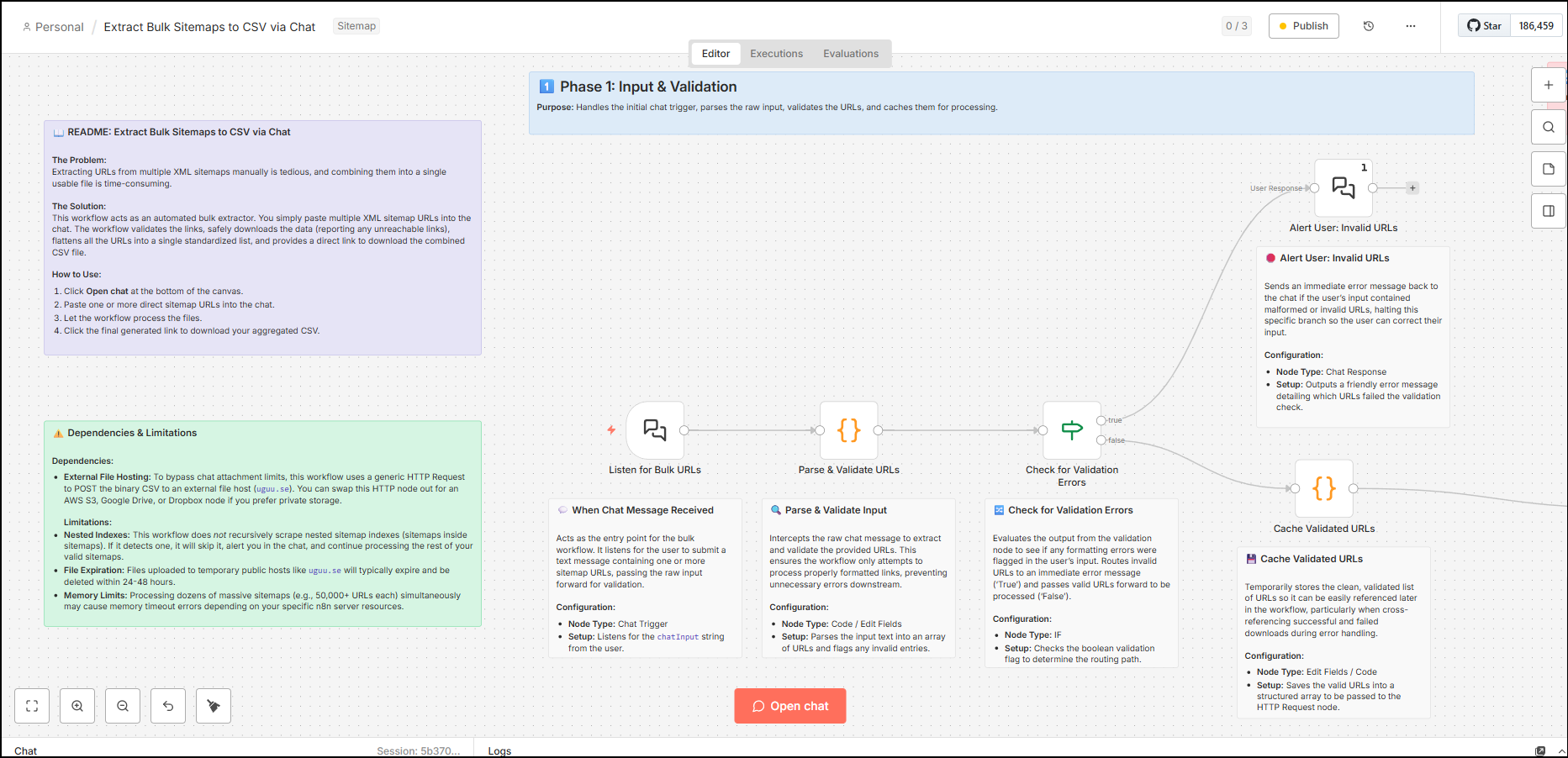
This completes the initial input and validation. Next, the workflow proceeds to fetch HTTP status and content of valid URLs and then further perform the next set of validation and analysis.
Bulk Data Fetching & Triage
The second phase uses the cursory checks a bit further, with fetching HTTP status codes and fetching data from the XML sitemaps.
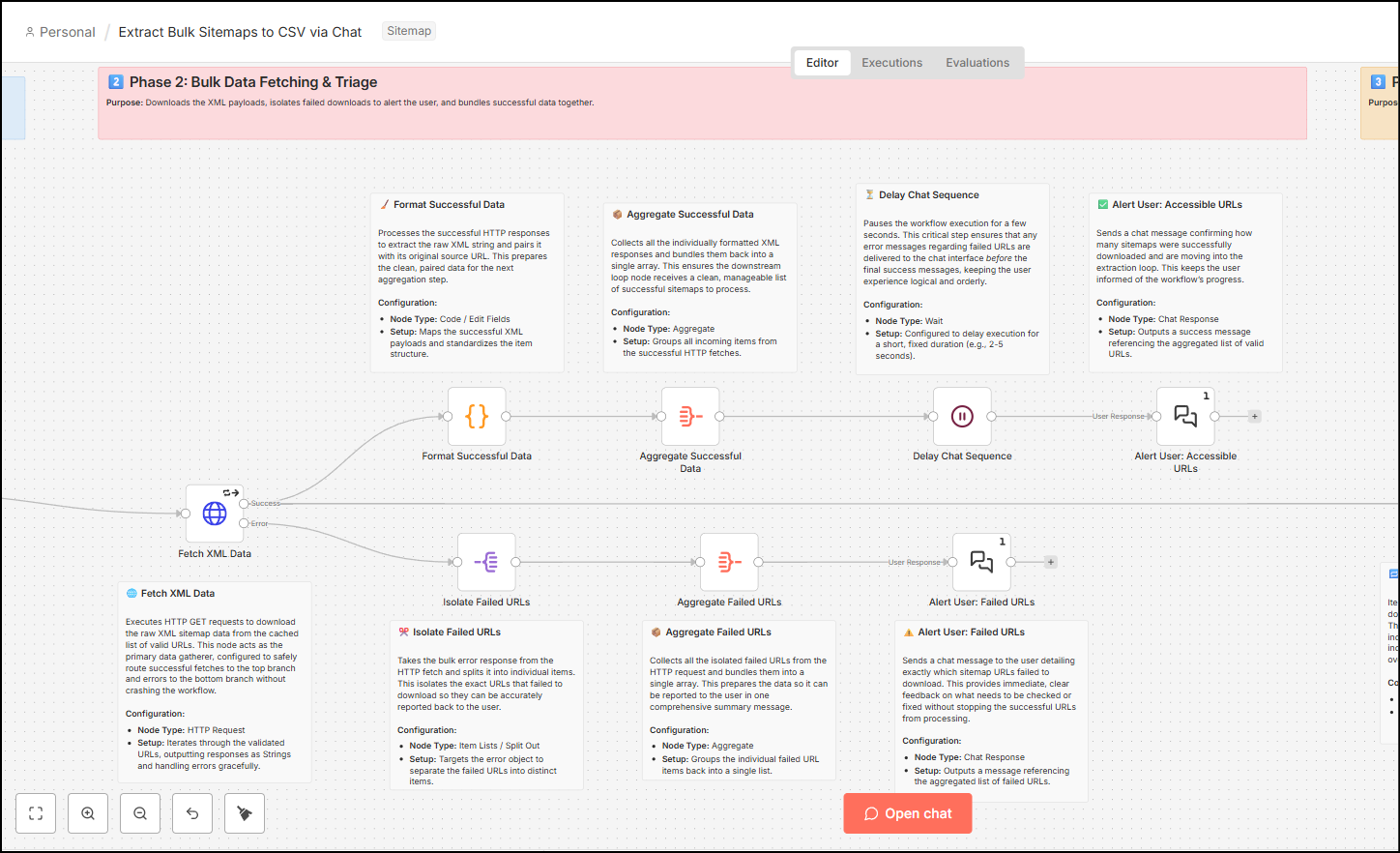
- Fetch XML Data (HTTP Request) – This node receives the cursory validated URLs from the previous node, then it executes the HTTP GET requests against all such URLs. This action downloads the raw XML sitemap data along with other header information, such as HTTP status codes, which later helps to further validate URLs with OK status and return the 404, 301 or other URLs back to the chat.
- The Fetch XML Data node splits into three streams. One stream goes out from the error output of the node. The other two go from the success output.
- The error output extends into JavaScript code that isolates the failed URLs, aggregates them to return the URL and its status code, which then ultimately feeds this information into the chat.
- From the success node, one stream helps in aggregating the valid URLs and feeds them into the chat.
- From the success node, another stream goes into the main Loop node that runs the workflow further.
Parsing & Extraction Loop
The third phase runs a loop that converts XML data for validated URLs to JSON, and validates if the data is a sitemap index instead of sitemap URLs.
- Process each sitemap (Loop) – to prevent memory overload, this node helps iterate through the validated URLs from the success output one by one so that each XML payload is processed successfully.
- This data is then parsed into JSON (as n8n works with JSON), which translates the raw XML data into a structured JSON object. This helps in isolating individual URLs from the data and filtering out noise when needed.
- This data is also scanned through to check if the sitemap XML URL was a sitemap index (containing other sitemap URLs). If this is so, then the data is collated to feed back into the chat and notify the user about it. Since this is done inside the loop, this doesn’t stop the workflow and the stream moves to another URL.
- If the URL is normal, it moves through the nodes to standardise URLs (filter only main URLs and the lastmod date). This helps filter out Hreflang URLs or Image URLs or other non-prominent URLs present in the sitemap.
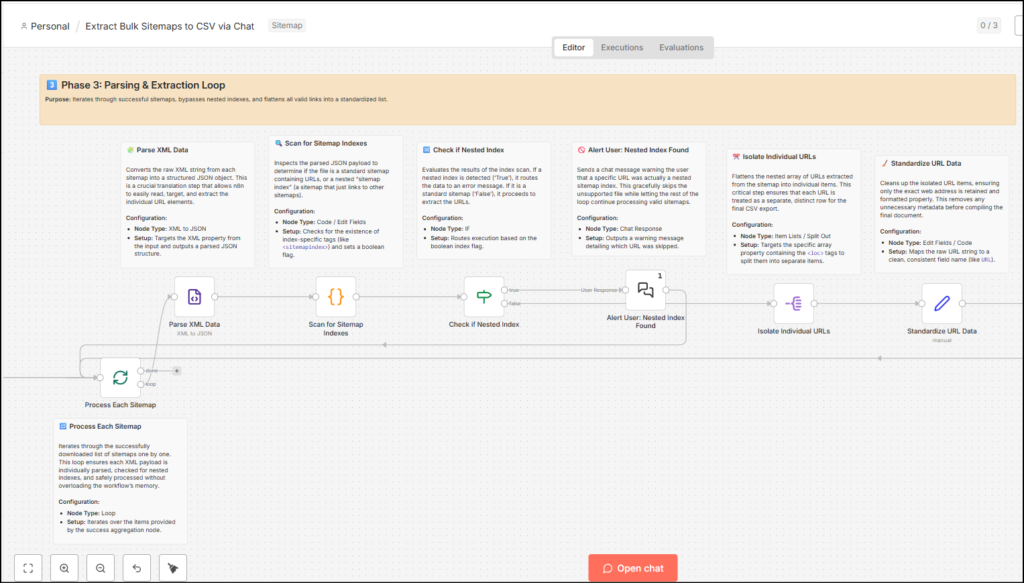
The loop doesn’t end here. The process moves to iterate on each sitemap file with the final output and delivery phase.
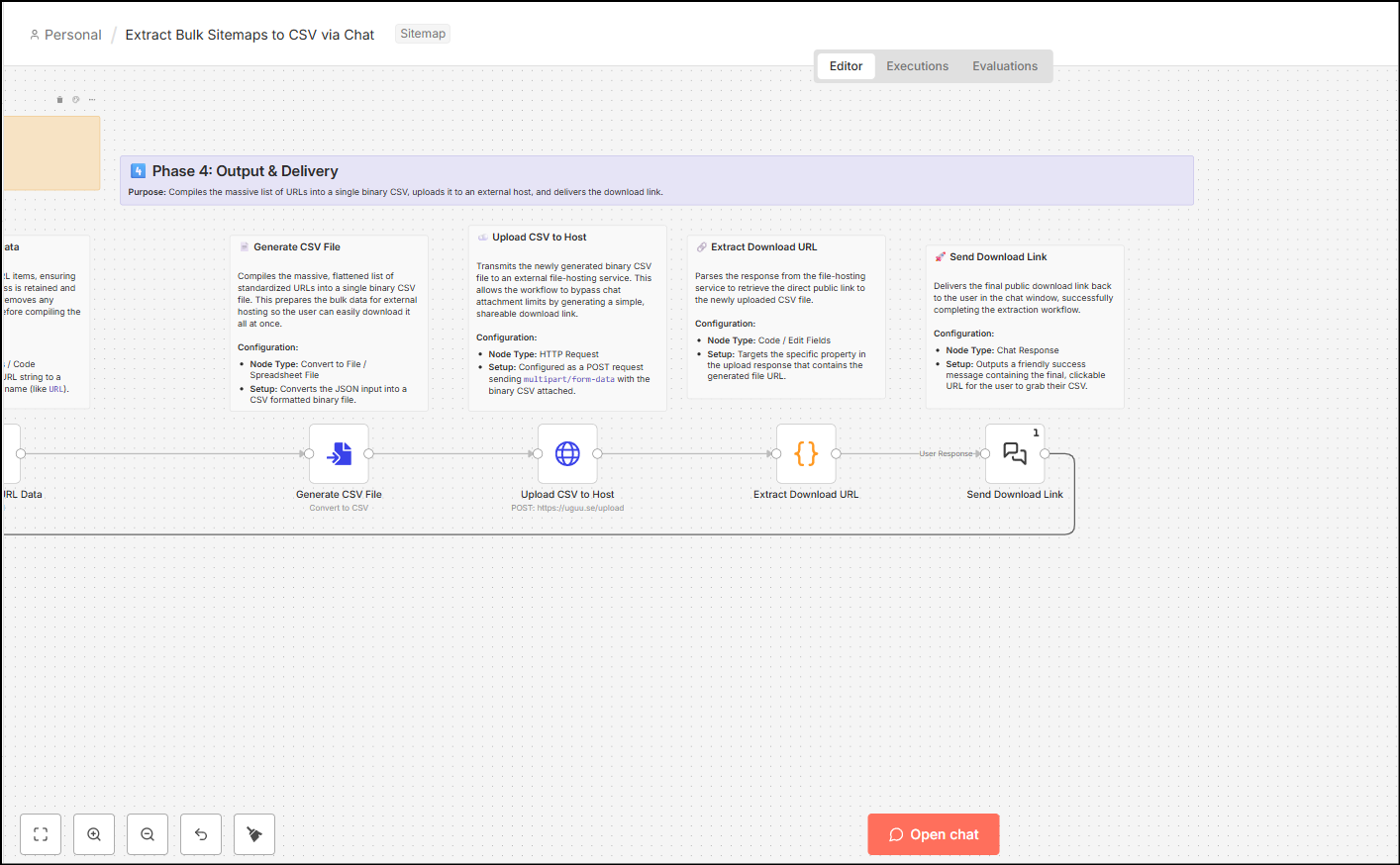
Output & Delivery
- Generate CSV File (Convert to File): The workflow takes the thousands of flattened, standardized URL rows and compiles them into a single, binary CSV file.
- This CSV file is then uploaded to a temporary hosting service and serves the final URL in the chat.
- This all happens in the loop, so if the user inputs 10 sitemap XML URLs (200 HTTP status, valid sitemap URLs), then the user will see all of them one by one in the chat interface.
- The automation finishes by delivering a friendly success message to the chat window, providing the final, clickable URL for the user to download their compiled CSV, alongside a count of the total URLs extracted.
Dependencies & Limitations of this SEO Process Automation
Because this is a simple workflow, you should know the limitations of this process. Most limitations depend on your system memory and process limits and one depends on the temporary file hosting service.
Because the temporary file hosting is an external service, sometimes it might be down or blocked in your enterprise setting. You can use your local machine to save files, or use your company-approved service to store the files for a longer duration to bypass this limitation.
This workflow is not designed to be recursive and scrape sitemaps inside of sitemaps (sitemap index files).
Memory limits – Processing dozens of sitemaps containing thousands of URLs might cause memory timeout errors, depending on your server resources or resource allocation to your system.
Your thoughts?
Let me know if you found this helpful. If you need a thing or two changed here, happy to do that – connect with me on LinkedIn or via email from the footer/about page and let me know what you need.