



My experience with sitemaps hasn’t been all good. They work very well in the GSC or Bing interface as they are built for search engines, but not for bulk auditing. I have been in a fix many times where I’ve had to submit tickets to development for maintaining sitemap.xml files or maintain them manually.
Apart from maintaining the sitemap module of the site, there are use cases where, for the client site or a competitor site, URLs need to be fetched from the sitemap, and while some online tools help you do that, I couldn’t find a very reliable one that I can use and recommend. Sometimes the tool didn’t work, and in enterprise or virtual location settings, these online tools aren’t whitelisted, so you can’t access them.
The problem statement here is very simple: If you have a sitemap.xml URL at hand, and you want to fetch all the URLs, how do you do that?
AI & GPTs? – To this date, I’ve seen huge variances in the output if I copy-paste contents from a sitemap to a GPT. I’ve seen characters mismatched; URL slugs don’t have perfect grammar, so it would autocorrect to make the URL point to a 404. If the URL is in another language, it would mix up the characters and make the URL unusable in the output. Also, most accesses I’ve had have hit the token limit when using large sets. Better prompting hasn’t helped.
Another option is to use online tools – Less reliable and non-standardised. Also, most of these online tool website URLs are not whitelisted in my current enterprise setting.
Solution: Use a workflow automation tool to do it yourself.
I’ve used n8n to create a simple workflow that would give you a list of URLs mentioned in that sitemap. Perfect for professionals working in an enterprise setting or in an e-commerce firm to download thousands of URLs for analysis.
What analysis?
There are multiple things you can do with site URLs from a sitemap.xml URL.
- Competitor research – what they are publishing, what has changed
- Check against mismatch – all published URL vs URLs in your sitemap file
- Detect 4XX, 5XX or 3XX URLs present in your sitemap
- Extract your product URLs or URLs based on a pattern when you do not have all the actual published page URLs on hand.
- and many more
So how do you actually do it?
How do you create a workflow that extracts all URLs from the sitemap URL that you enter, and gives you a clean and nice CSV file?
Creating Automations with n8n
With n8n (community version), you can create workflows using a very intuitive visual interface that serves as your operational layer and publish them to websites or internal sites so your colleagues can use the flow with minimal effort.
n8n resources:
- What is n8n?
- How to set up the community version on your PC using Docker
- Personal opinion – Use Chrome (with Ask Gemini access) or Comet browser to use n8n and let AI help you create your workflows easily – super helpful for non-coders like me.
Your n8n Workflow File (JSON)
Use this free SEO Automation n8n template to break free from the limitations of free online tools, GPTs, by hosting this tool yourself.
You can download the workflow file from here.
You can also copy and paste this JSON code directly into your n8n instance. (click to expand)
{
"nodes": [
{
"parameters": {
"content": "## 📥 1. Input & Validation\nListens for user chat input, fetches the sitemap URL, and validates if the domain is correctly formatted and accessible.",
"height": 736,
"width": 1382,
"color": 3
},
"id": "557f84b3-8502-417a-898d-76c41bd7175b",
"name": "Sticky Note",
"type": "n8n-nodes-base.stickyNote",
"typeVersion": 1,
"position": [
-400,
160
]
},
{
"parameters": {
"content": "## ⚙️ 2. XML Parsing & Transformation\nConverts the raw XML to JSON, checks if it is a sitemap index, splits the relevant URLs, and maps the fields for data export.",
"height": 786,
"width": 1360,
"color": 2
},
"id": "3651fac9-ba8e-409c-a57f-9eb17f1cd772",
"name": "Sticky Note 1",
"type": "n8n-nodes-base.stickyNote",
"typeVersion": 1,
"position": [
1088,
-320
]
},
{
"parameters": {
"content": "## 📦 3. File Packaging & Upload\nConverts the extracted data into a sanitized binary file, uploads it to the temporary API host, and returns the final download link to the user.",
"height": 1106,
"width": 2300,
"color": 6
},
"id": "097888c1-2e15-4b5c-880f-0097688d8a6b",
"name": "Sticky Note 2",
"type": "n8n-nodes-base.stickyNote",
"typeVersion": 1,
"position": [
2560,
32
]
},
{
"parameters": {
"content": "## 📖 README: Sitemap URL Extractor\n\n**What this tool does:**\nThis automated chat assistant fetches, parses, and extracts all nested URLs from any website's XML sitemap. It converts the raw XML data into a clean, structured file and generates a temporary, one-click download link.\n\n**How to use it:**\n1. **Input:** The user opens the chat window and pastes a valid sitemap URL (e.g., `https://seobatter.com/page-sitemap.xml`).\n2. **Process:** The workflow automatically validates the domain, fetches the XML, flattens the hierarchy, and extracts the target URLs.\n3. **Output:** The data is compiled into a downloadable file and uploaded to a temporary host. The user receives the secure download link directly in the chat.",
"height": 300,
"width": 800,
"color": 7
},
"id": "028e0f33-b6e9-4ff5-9440-67a1a1f3ed70",
"name": "Sticky Note README",
"type": "n8n-nodes-base.stickyNote",
"typeVersion": 1,
"position": [
-1232,
128
]
},
{
"parameters": {
"content": "## ⚠️ Dependencies & Limitations\n\n**1. Direct Sitemaps Only:**\nThis workflow is designed to parse standard XML sitemaps containing direct page links (`<url>`). **It does not recursively crawl Sitemap Index files** (`<sitemapindex>`). If a user inputs an index URL, they must manually provide the underlying child sitemap URLs instead.\n\n**2. Third-Party File Hosting:**\nThis workflow relies on an external, public API (e.g., Uguu, Catbox.moe, Tmpfiles) to host the final file. If that third-party service experiences downtime or changes its CORS/filetype policies, the final upload node will fail.\n\n**3. Memory Constraints:**\nExtremely large sitemaps (e.g., 50,000+ URLs) may exceed n8n's default memory limits during the XML-to-JSON conversion step. This tool is best suited for standard-sized sitemaps.",
"height": 364,
"width": 550,
"color": 6
},
"id": "65838709-c4e6-4c84-b678-4eaccbe762dc",
"name": "Sticky Note Limitations",
"type": "n8n-nodes-base.stickyNote",
"typeVersion": 1,
"position": [
-1104,
496
]
},
{
"parameters": {
"options": {
"responseMode": "responseNodes"
}
},
"type": "@n8n/n8n-nodes-langchain.chatTrigger",
"typeVersion": 1.4,
"position": [
-304,
304
],
"id": "c19716a6-7397-4fe3-b627-e50e254a382a",
"name": "Listen for Sitemap URL",
"webhookId": "5956e7b2-11eb-4ba4-9164-06f7e662ec10",
"notesInFlow": true,
"notes": "example url: https://seobatter.com/page-sitemap.xml"
},
{
"parameters": {
"url": "={{ $json.chatInput }}",
"options": {
"response": {
"response": {
"fullResponse": true
}
}
}
},
"type": "n8n-nodes-base.httpRequest",
"typeVersion": 4.3,
"position": [
32,
304
],
"id": "be408a08-e781-489a-b59a-23adcc552f4b",
"name": "Fetch Sitemap XML",
"retryOnFail": true,
"maxTries": 5,
"waitBetweenTries": 3000,
"onError": "continueErrorOutput"
},
{
"parameters": {
"conditions": {
"options": {
"caseSensitive": true,
"leftValue": "",
"typeValidation": "strict",
"version": 3
},
"conditions": [
{
"id": "1125f0dc-f7f6-4c92-bb8b-73ee8ec4c01a",
"leftValue": "={{ $json.statusCode }}",
"rightValue": 200,
"operator": {
"type": "number",
"operation": "equals"
}
}
],
"combinator": "and"
},
"options": {}
},
"type": "n8n-nodes-base.if",
"typeVersion": 2.3,
"position": [
400,
288
],
"id": "3b6b8e80-59f3-4894-b99a-8510fadc8850",
"name": "Check if URL is Accessible",
"executeOnce": true
},
{
"parameters": {
"message": "Please enter a valid sitemap or sitemap index URL. Example: \"https://seobatter.com/post-sitemap.xml\"",
"waitUserReply": false,
"options": {}
},
"type": "@n8n/n8n-nodes-langchain.chat",
"typeVersion": 1,
"position": [
800,
416
],
"id": "bd576d6a-8cf1-4d0d-a41b-d2a7791c7b12",
"name": "Alert User: Invalid URL"
},
{
"parameters": {
"dataPropertyName": "=data",
"options": {}
},
"type": "n8n-nodes-base.xml",
"typeVersion": 1,
"position": [
1232,
272
],
"id": "c6150cc9-2834-4df3-8271-1d4ac397baba",
"name": "Parse XML to JSON Object"
},
{
"parameters": {
"conditions": {
"options": {
"caseSensitive": true,
"leftValue": "",
"typeValidation": "strict",
"version": 3
},
"conditions": [
{
"id": "98129e08-b536-492d-8cc6-e13bda990c00",
"leftValue": "={{ $json.sitemapindex }}",
"rightValue": "sitemapindex",
"operator": {
"type": "object",
"operation": "exists",
"singleValue": true
}
},
{
"id": "a3bd9947-a125-4271-b2b1-7df86e6a5b06",
"leftValue": "={{$json.urlset}}",
"rightValue": "",
"operator": {
"type": "object",
"operation": "empty",
"singleValue": true
}
}
],
"combinator": "and"
},
"options": {}
},
"type": "n8n-nodes-base.if",
"typeVersion": 2.3,
"position": [
1552,
272
],
"id": "19c890d0-f476-44bf-9bdc-87f971e8d6e2",
"name": "Check for Sitemap Index"
},
{
"parameters": {
"message": "The URL that you've entered is a sitemap index. Please start the process again and entry a sitemap.xml URL.",
"waitUserReply": false,
"options": {}
},
"type": "@n8n/n8n-nodes-langchain.chat",
"typeVersion": 1,
"position": [
1888,
192
],
"id": "1e01292f-c322-410d-8194-bf23d23628ad",
"name": "Alert User: Index Not Supported",
"executeOnce": true
},
{
"parameters": {
"fieldToSplitOut": "urlset.url",
"options": {}
},
"type": "n8n-nodes-base.splitOut",
"typeVersion": 1,
"position": [
2240,
288
],
"id": "fb3d8c43-77b7-4350-9aea-55187d0694de",
"name": "Extract URLs Array"
},
{
"parameters": {
"assignments": {
"assignments": [
{
"id": "227739b0-b655-4d6b-a7e8-cd86c5452dc3",
"name": "loc",
"value": "={{ $json.loc }}",
"type": "string"
},
{
"id": "074578ef-ecd0-434c-a2f5-4ba75aeaadc9",
"name": "lastmod",
"value": "={{ $json.lastmod }}",
"type": "string"
}
]
},
"options": {}
},
"type": "n8n-nodes-base.set",
"typeVersion": 3.4,
"position": [
2672,
288
],
"id": "273eb943-80d5-42e1-b76e-f60345d3c7f9",
"name": "Format URL Data"
},
{
"parameters": {
"options": {
"headerRow": true
}
},
"type": "n8n-nodes-base.convertToFile",
"typeVersion": 1.1,
"position": [
3184,
544
],
"id": "2382f0ee-13df-4f57-8922-70b6215f77b5",
"name": "Convert Data to CSV"
},
{
"parameters": {
"method": "POST",
"url": "https://uguu.se/upload",
"sendBody": true,
"contentType": "multipart-form-data",
"bodyParameters": {
"parameters": [
{
"name": "output",
"value": "csv"
},
{
"parameterType": "formBinaryData",
"name": "files[]",
"inputDataFieldName": "data"
}
]
},
"options": {}
},
"type": "n8n-nodes-base.httpRequest",
"typeVersion": 4.3,
"position": [
3568,
544
],
"id": "3926bd43-c5e5-4aff-bff1-9552ad20e135",
"name": "Upload File to Host",
"alwaysOutputData": false,
"onError": "continueErrorOutput"
},
{
"parameters": {
"jsCode": "const url = $json.files?.[0]?.url;\n\nreturn [\n {\n json: {\n message: `<${url}>`\n }\n }\n];"
},
"type": "n8n-nodes-base.code",
"typeVersion": 2,
"position": [
4288,
528
],
"id": "b7e236de-bb2e-43b7-8cbc-6f0b8b715986",
"name": "Format Final Output"
},
{
"parameters": {
"message": "=Download your file here:\n{{ $json.message }}\n\n",
"waitUserReply": false,
"options": {}
},
"type": "@n8n/n8n-nodes-langchain.chat",
"typeVersion": 1,
"position": [
4624,
528
],
"id": "fb2c1b08-5c1c-4955-b0d4-00f3575ecf4c",
"name": "Send Download Link",
"executeOnce": true,
"onError": "continueRegularOutput"
},
{
"parameters": {
"fieldsToSummarize": {
"values": [
{
"field": "=loc"
}
]
},
"options": {}
},
"type": "n8n-nodes-base.summarize",
"typeVersion": 1.1,
"position": [
3056,
384
],
"id": "08c50262-1a52-4e25-8eb0-44843d105dc4",
"name": "Summarize Extraction Stats"
},
{
"parameters": {
"message": "=Total number of URLs: {{ $json.count_loc }}\n\n",
"waitUserReply": false,
"options": {}
},
"type": "@n8n/n8n-nodes-langchain.chat",
"typeVersion": 1,
"position": [
3488,
384
],
"id": "3802bf90-7349-4037-977c-b4c9b53c2403",
"name": "Send Summary",
"executeOnce": true,
"onError": "continueRegularOutput"
},
{
"parameters": {
"message": "The output resulted in an error. Please try again or ask the administrator to update the workflow.",
"options": {}
},
"type": "@n8n/n8n-nodes-langchain.chat",
"typeVersion": 1,
"position": [
3952,
656
],
"id": "d64f5296-60d8-422c-b956-40e79415cdd5",
"name": "Alert User: Upload Failed"
},
{
"parameters": {
"content": "### 💬 Listen for Sitemap URL\n\n**What it does:**\nActs as the workflow's entry point. It opens the built-in n8n chat interface and listens for the user to submit a text message (the sitemap URL).\n\n**Configuration:**\nStandard Chat Trigger node configured to capture the `chatInput` string.\n\n**Limitation:**\n* It accepts any text string; URL format validation has to be handled by downstream nodes.",
"height": 340,
"width": 320,
"color": 7
},
"id": "15596616-cfdd-4129-8c93-c3b7995c7e94",
"name": "Sticky Note - Node 1",
"type": "n8n-nodes-base.stickyNote",
"typeVersion": 1,
"position": [
-384,
448
]
},
{
"parameters": {
"content": "### 🌐 Fetch Sitemap XML\n\nMakes an HTTP GET request to download the raw XML sitemap data from the user-provided URL.\n\n**Configuration:**\n* **Method:** `GET`\n* **URL:** Mapped to chat input\n* **Response Format:** `String` *(Crucial: Prevents n8n from prematurely parsing the XML so it can be cleaned).*",
"height": 290,
"width": 320,
"color": 7
},
"id": "2836f0f6-5012-452f-a6df-a92785d8b44b",
"name": "Sticky Note - Node 2",
"type": "n8n-nodes-base.stickyNote",
"typeVersion": 1,
"position": [
-48,
448
]
},
{
"parameters": {
"content": "### 🚦 Check if URL is Accessible\n\nVerifies the HTTP Request was successful by checking the server's exact response code. Routes to 'True' for a successful fetch, and 'False' for any errors to halt the workflow.\n\n**Configuration:**\n* **Node Type:** IF\n* **Setup:** Checks if the returned HTTP Status Code equals `200`.",
"height": 278,
"width": 320,
"color": 7
},
"id": "adeb3748-1678-488b-9fbb-2e27e64823a3",
"name": "Sticky Note - Node 3",
"type": "n8n-nodes-base.stickyNote",
"typeVersion": 1,
"position": [
304,
448
]
},
{
"parameters": {
"content": "### 🛑 Alert User: Invalid URL\n\nSends an error message to the chat when the website returns an HTTP status code other than `200` (e.g., 404 Not Found, 500 Server Error), effectively stopping the workflow.\n\n**Configuration:**\n* **Node Type:** Chat Response\n* **Setup:** Contains a friendly, hardcoded error message explaining the failure.",
"height": 280,
"width": 320,
"color": 7
},
"id": "f2a6f86b-eba9-4c13-9560-d211872897aa",
"name": "Sticky Note - Node 4",
"type": "n8n-nodes-base.stickyNote",
"typeVersion": 1,
"position": [
656,
560
]
},
{
"parameters": {
"content": "### 🔣 Parse XML to JSON Object\n\nConverts the successfully downloaded raw XML text string into a structured JSON object. This translates the payload so the workflow can easily check for index files and extract the nested URLs.\n\n**Configuration:**\n* **Node Type:** XML\n* **Mode:** XML to JSON",
"height": 256,
"width": 320,
"color": 7
},
"id": "30e137e8-a21a-41df-99e6-5c9e015117db",
"name": "Sticky Note - Node 5",
"type": "n8n-nodes-base.stickyNote",
"typeVersion": 1,
"position": [
1104,
-16
]
},
{
"parameters": {
"content": "### 🛑 Alert User: Index Not Supported\n\nSends an error message to the chat when the parsed XML is identified as a Sitemap Index (`<sitemapindex>`) rather than a standard URL list, stopping the workflow since recursive crawling is not supported.\n\n**Configuration:**\n* **Node Type:** Chat Response\n* **Setup:** Hardcoded error message instructing the user to provide direct child sitemap URLs instead.",
"height": 300,
"width": 320,
"color": 7
},
"id": "a25157e8-a6cd-4a44-b5f3-5cc1f19638a7",
"name": "Sticky Note - Node 7",
"type": "n8n-nodes-base.stickyNote",
"typeVersion": 1,
"position": [
1776,
-128
]
},
{
"parameters": {
"content": "### 🔀 Check for Sitemap Index\n\nExamines the parsed JSON data to determine if the root element is a `<sitemapindex>` instead of a standard `<urlset>`. This ensures the workflow only attempts to extract URLs from standard sitemaps and catches nested indices before they break the workflow.\n\n**Configuration:**\n* **Node Type:** IF\n* **Setup:** Checks if the JSON key `sitemapindex` exists. Routes to 'True' (error path) if found, and 'False' (continue path) if not.",
"height": 352,
"width": 320,
"color": 7
},
"id": "d872ece0-176e-4377-b9e6-3b81bd0fec83",
"name": "Sticky Note - Node 6",
"type": "n8n-nodes-base.stickyNote",
"typeVersion": 1,
"position": [
1440,
-96
]
},
{
"parameters": {
"content": "### 📋 Extract URLs Array\n\nIsolates the list of URLs from the parsed JSON and splits them into individual n8n items. This converts the single block of XML data into a list of separate, processable links that the workflow can format and export.\n\n**Configuration:**\n* **Node Type:** Item Lists\n* **Setup:** Configured to target and split out the specific JSON array containing the page URLs (usually `urlset.url`).",
"height": 300,
"width": 320,
"color": 7
},
"id": "661543e6-9335-49d3-9b99-27707233cc74",
"name": "Sticky Note - Node 8",
"type": "n8n-nodes-base.stickyNote",
"typeVersion": 1,
"position": [
2112,
-48
]
},
{
"parameters": {
"content": "### 🧹 Format URL Data\n\nProcesses the extracted array of URLs, cleaning and mapping the raw data into a standardized structure. This ensures the data is perfectly formatted before being converted into the final export file.\n\n**Configuration:**\n* **Node Type:** Edit Fields / Code\n* **Setup:** Maps and isolates the specific URL properties (like the `<loc>` tag) needed for the final output.",
"height": 300,
"width": 320,
"color": 7
},
"id": "0c204d2a-7490-4ea2-ab9a-3c182d02a03e",
"name": "Sticky Note - Node 9",
"type": "n8n-nodes-base.stickyNote",
"typeVersion": 1,
"position": [
2576,
448
]
},
{
"parameters": {
"content": "### 📊 Summarize Extraction Stats\n\nAggregates the processed data to calculate the total number of extracted URLs. This provides the user with a quick success metric.\n\n**Configuration:**\n* **Node Type:** Summarize\n* **Setup:** Counts the total number of items passed from the formatting step.",
"height": 232,
"width": 400,
"color": 7
},
"id": "d72d3aa3-a9e5-4f09-8c0b-3ebc48fcd25f",
"name": "Sticky Note - Node 10",
"type": "n8n-nodes-base.stickyNote",
"typeVersion": 1,
"position": [
2928,
144
]
},
{
"parameters": {
"content": "### 💬 Send Summary\n\nSends a chat message to the user displaying the total number of URLs successfully extracted.\n\n**Configuration:**\n* **Node Type:** Chat Response\n* **Setup:** Outputs the aggregated count from the Summarize node.",
"height": 228,
"width": 352,
"color": 7
},
"id": "c453a30b-5df6-4c19-b7a1-ed67dc1cfd81",
"name": "Sticky Note - Node 11",
"type": "n8n-nodes-base.stickyNote",
"typeVersion": 1,
"position": [
3344,
144
]
},
{
"parameters": {
"content": "### 📄 Convert Data to CSV\n\nConverts the structured JSON data into a clean CSV file format, preparing it for the final file upload.\n\n**Configuration:**\n* **Node Type:** Convert to CSV / Spreadsheet File\n* **Setup:** Transforms the extracted items into a binary CSV payload.",
"height": 260,
"width": 320,
"color": 7
},
"id": "5847a128-7846-46e6-a606-f20b737160ad",
"name": "Sticky Note - Node 12",
"type": "n8n-nodes-base.stickyNote",
"typeVersion": 1,
"position": [
3104,
704
]
},
{
"parameters": {
"content": "### 🌐 Upload File to Host\n\nTakes the generated CSV file and uploads it to a temporary third-party file hosting service via an API request. This step generates the publicly accessible URL that the user will use to download their data.\n\n**Configuration:**\n* **Node Type:** HTTP Request\n* **Setup:** Sends a `POST` request containing the binary CSV file to the hosting service (e.g., Uguu) using a multipart/form-data payload.",
"height": 304,
"width": 320,
"color": 7
},
"id": "47b4408b-b6c8-410b-928e-d2666705ff2d",
"name": "Sticky Note - Node 13",
"type": "n8n-nodes-base.stickyNote",
"typeVersion": 1,
"position": [
3472,
704
]
},
{
"parameters": {
"content": "### 🔤 Format Final Output\n\nExtracts the public file URL from the hosting provider's API response and formats it into a clean string. This translates the raw upload data from the previous step into a perfect, clickable download link so the final chat node can easily present it to the user.\n\n**Configuration:**\n* **Node Type:** Set / Edit Fields\n* **Setup:** Isolates the newly generated file URL from the HTTP upload response.",
"height": 296,
"width": 320,
"color": 7
},
"id": "b246f3eb-a7a9-4848-84fe-f3ef51432d00",
"name": "Sticky Note - Node 14",
"type": "n8n-nodes-base.stickyNote",
"typeVersion": 1,
"position": [
4192,
672
]
},
{
"parameters": {
"content": "### 💬 Send Download Link\n\nSends the final chat message to the user containing the clickable public URL generated in the previous step, allowing them to easily download their extracted sitemap data.\n\n**Configuration:**\n* **Node Type:** Chat Response\n* **Setup:** Outputs a message embedding the formatted download URL.",
"height": 280,
"width": 320,
"color": 7
},
"id": "b641d9dd-ace0-4844-bff5-f266fc08748b",
"name": "Sticky Note - Node 15",
"type": "n8n-nodes-base.stickyNote",
"typeVersion": 1,
"position": [
4528,
672
]
},
{
"parameters": {
"content": "### 🛑 Alert User: Upload Failed\n\nSends a chat message informing the user that the final file upload failed, effectively halting the workflow. This triggers if the third-party hosting service is down or rejects the CSV payload, letting the user know why they won't receive a download link.\n\n**Configuration:**\n* **Node Type:** Chat Response\n* **Setup:** Contains a friendly, hardcoded error message explaining the upload failure.",
"height": 316,
"width": 320,
"color": 7
},
"id": "4809d4b8-d912-4d58-9e3a-2448697798ef",
"name": "Sticky Note - Node 16",
"type": "n8n-nodes-base.stickyNote",
"typeVersion": 1,
"position": [
3872,
800
]
}
],
"connections": {
"Listen for Sitemap URL": {
"main": [
[
{
"node": "Fetch Sitemap XML",
"type": "main",
"index": 0
}
]
]
},
"Fetch Sitemap XML": {
"main": [
[
{
"node": "Check if URL is Accessible",
"type": "main",
"index": 0
}
],
[
{
"node": "Alert User: Invalid URL",
"type": "main",
"index": 0
}
]
]
},
"Check if URL is Accessible": {
"main": [
[
{
"node": "Parse XML to JSON Object",
"type": "main",
"index": 0
}
],
[
{
"node": "Alert User: Invalid URL",
"type": "main",
"index": 0
}
]
]
},
"Alert User: Invalid URL": {
"main": [
[]
]
},
"Parse XML to JSON Object": {
"main": [
[
{
"node": "Check for Sitemap Index",
"type": "main",
"index": 0
}
]
]
},
"Check for Sitemap Index": {
"main": [
[
{
"node": "Alert User: Index Not Supported",
"type": "main",
"index": 0
}
],
[
{
"node": "Extract URLs Array",
"type": "main",
"index": 0
}
]
]
},
"Extract URLs Array": {
"main": [
[
{
"node": "Format URL Data",
"type": "main",
"index": 0
}
]
]
},
"Format URL Data": {
"main": [
[
{
"node": "Summarize Extraction Stats",
"type": "main",
"index": 0
},
{
"node": "Convert Data to CSV",
"type": "main",
"index": 0
}
]
]
},
"Convert Data to CSV": {
"main": [
[
{
"node": "Upload File to Host",
"type": "main",
"index": 0
}
]
]
},
"Upload File to Host": {
"main": [
[
{
"node": "Format Final Output",
"type": "main",
"index": 0
}
],
[
{
"node": "Alert User: Upload Failed",
"type": "main",
"index": 0
}
]
]
},
"Format Final Output": {
"main": [
[
{
"node": "Send Download Link",
"type": "main",
"index": 0
}
]
]
},
"Send Download Link": {
"main": [
[]
]
},
"Summarize Extraction Stats": {
"main": [
[
{
"node": "Send Summary",
"type": "main",
"index": 0
}
]
]
}
},
"pinData": {},
"meta": {
"templateCredsSetupCompleted": true,
"instanceId": "edf1ced83e9ab9272c6f8c5577054e33710c688c25fbcb912c88d83471eb73e3"
}
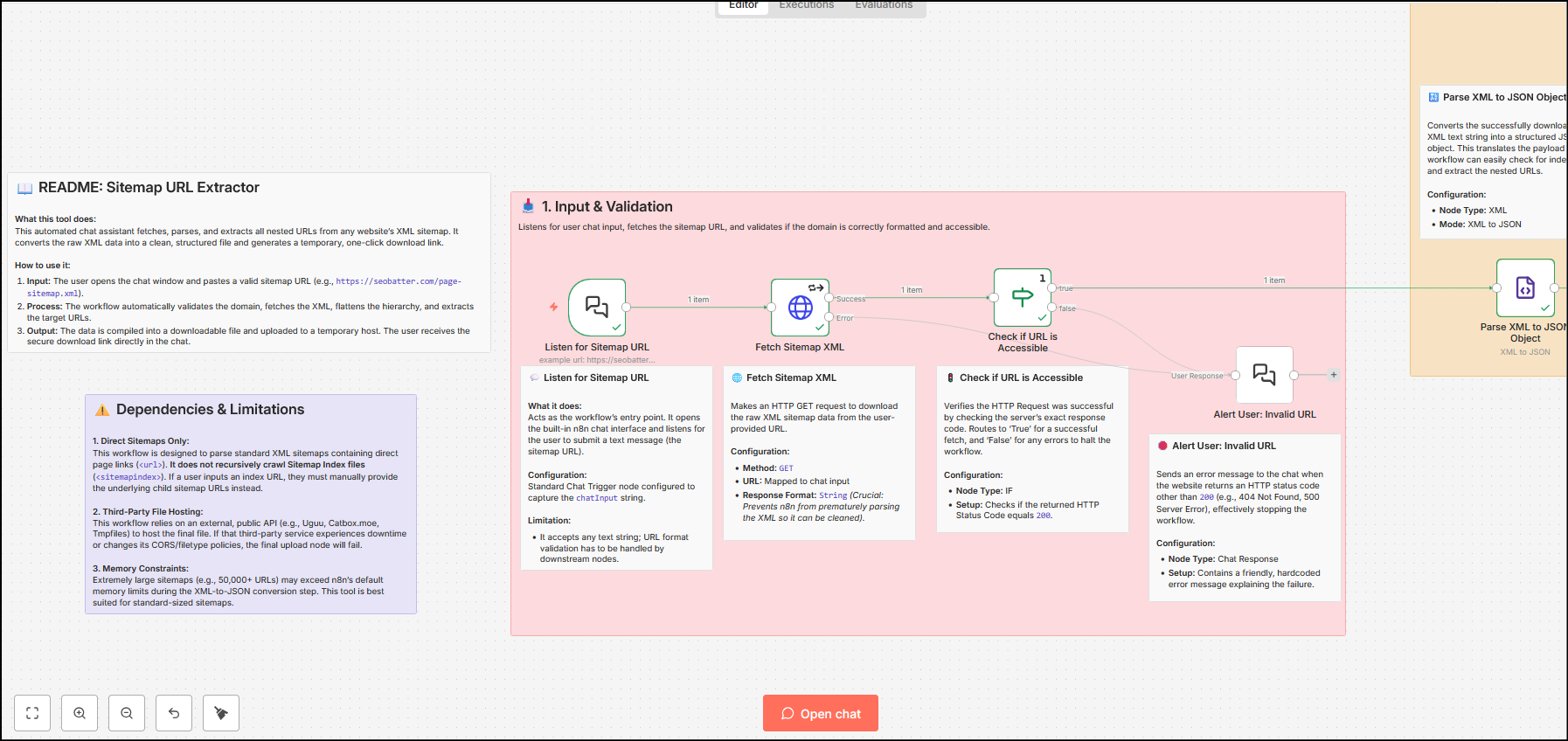
}When you paste the workflow, you’ll see sticky notes explaining the complete workflow. You should start from the Readme sticky and then move on to reading stickies for each node. This should help you get an idea of what each node does and how the process works.
Extract URLs From Sitemaps (n8n workflow) – Explained
The workflow is categorised into three parts:
- Input and validation
- XML parsing and data transformation
- File handling and final response
Input and validation
The initial phase of the SEO workflow uses the chat interface to take input from the user and ensure that the input is valid. It also fetches the URL using the GET method and verifies if the status code of the URL is 200 – this ensures a valid working URL from input. In case the status code is not 200, the chat responds with an error message.
XML parsing and data transformation
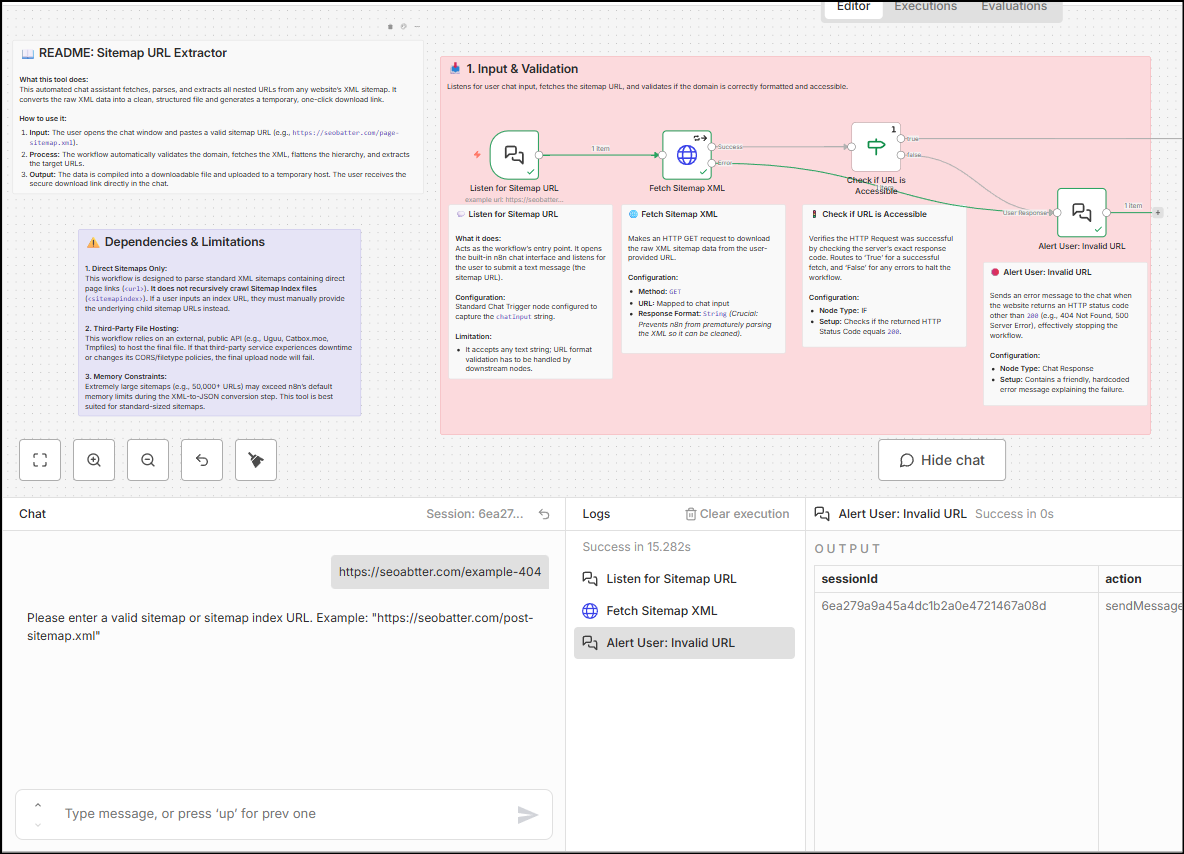
In this second phase, the data is fetched using the HTTP GET request and it is in XML format. This data is transformed from XML to JSON. After this is done, the data is again checked for sitemap vs sitemap index signals.
Since the workflow is not created to handle sitemap index URLs, the validation ensures that a response is sent to the chat in the case the user has input a sitemap index URL rather than a sitemap XML URL.
File handling and final response
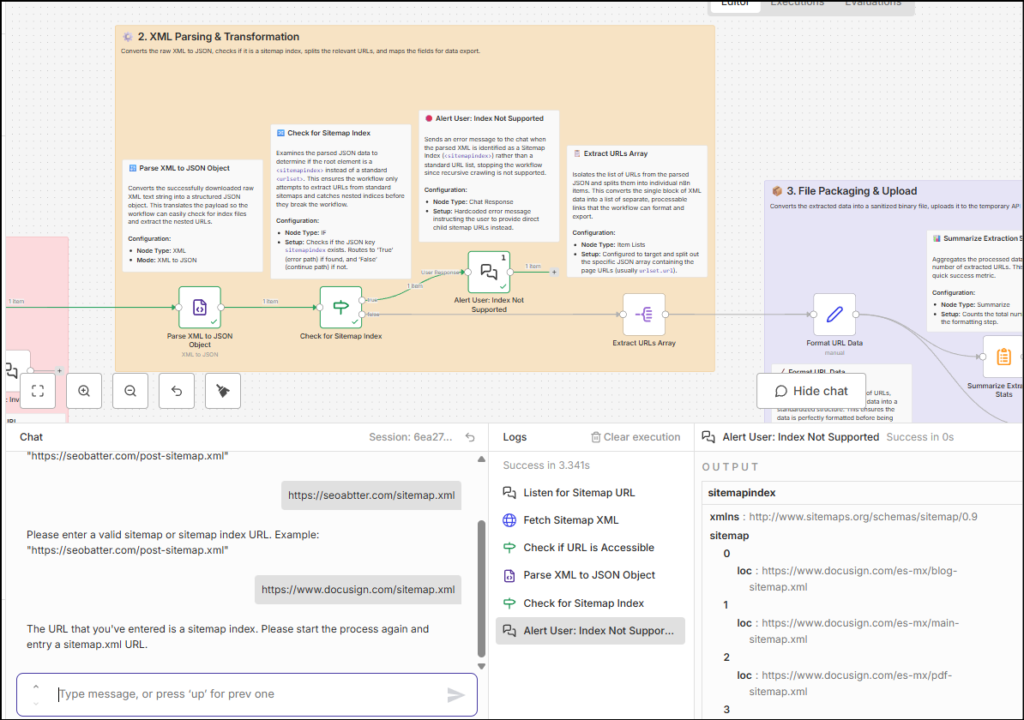
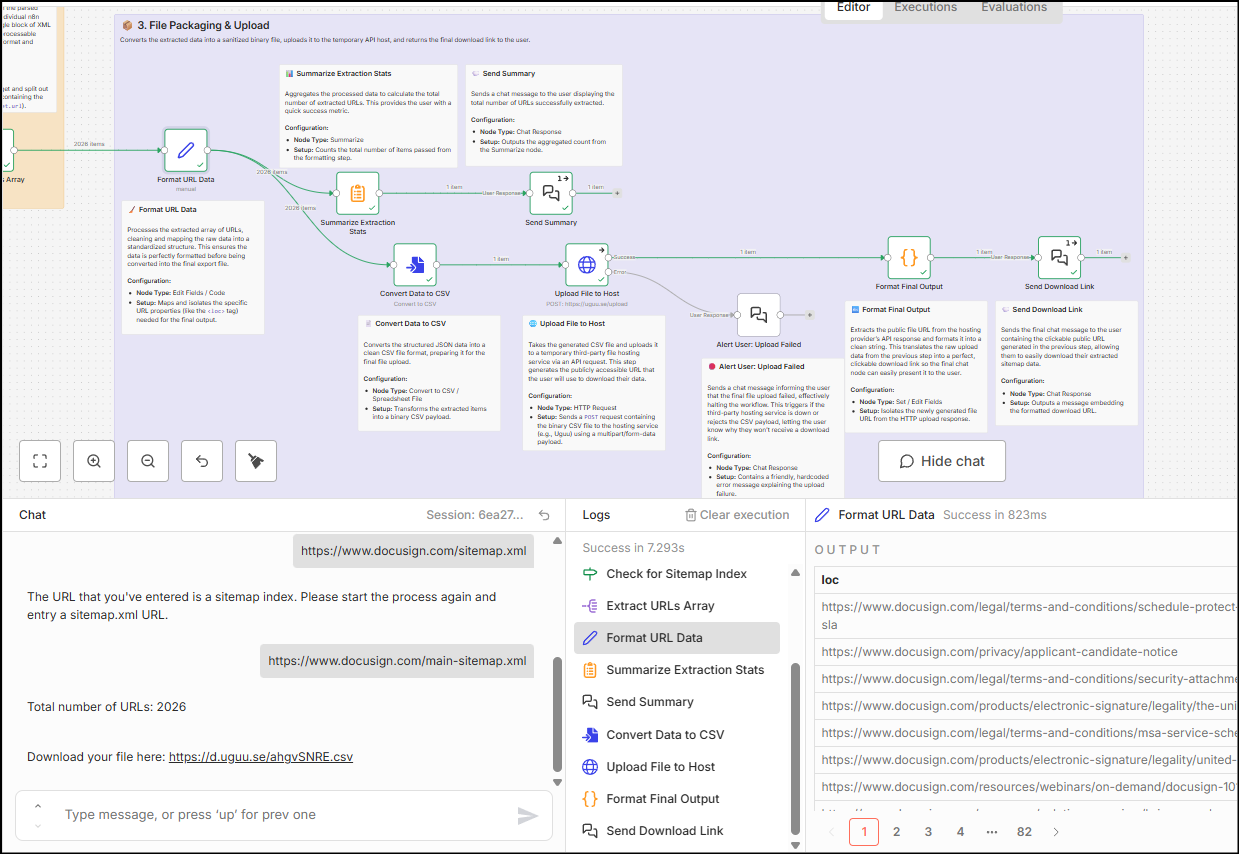
The final phase of the workflow focuses on cleaning the file, uploading it to a temporary hosting service and delivering the file link via the chat interface.
Cleaning of the file is done by mapping only the loc field and lastmod fields to the final file, so that you do not get noise such as URLs from Hrelflang or Images in the file. Additionally, there is a summary node that uses the ‘Aggregation’ node to count the number of URLs found on the sitemap file and report it back to the chat interface.
There is also a check that relies on the output from the temporary file hosting response – if the upload doesn’t work, the error message is fed into the chat interface.
Your thoughts?
Let me know if you found this helpful. If you need a thing or two changed here, happy to do that – connect with me on LinkedIn or via email from the footer/about page and let me know what you need.