


If you are an SEO, you would have frequently done on-page SEO audits. Your day-to-day work would revolve around checking meta tags, hreflang tags, OG & Twitter tags, headings, and more.
While there are hundreds of tools to audit a lot of these items, if you’re also limited by the unavailability of those tools, the hassle of captchas in the online SEO tools or just want to use a homemade solution or use something for privacy, this article is for you.
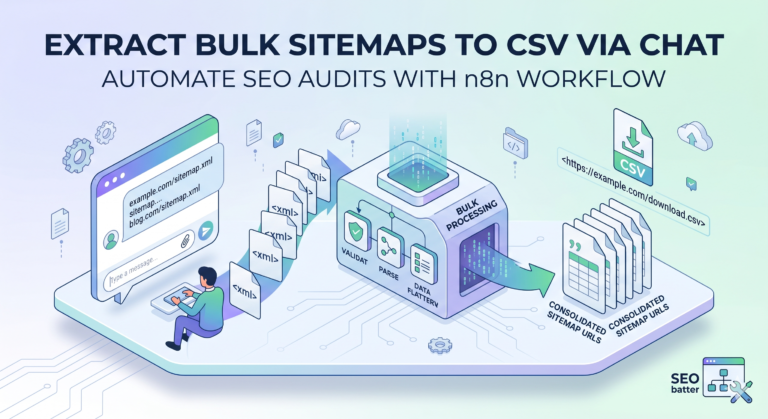
While I am on a spree to do SEO workflow automations, I am testing and using a lot of n8n features. This moderate-level workflow allows you to turn a simple chat input into a bulk URL crawler, extracting 27+ on-page SEO elements from the HTML and headers of the page. It gives you a CSV download link when it finishes, which you can use to improve on those elements easily.
What This Workflow Actually Does
At a high level, this n8n SEO workflow:
- Accept 100 URLs directly from the chat message (you can increase the limit).
- Cleans, normalises, validates, and deduplicates the URLs.
- Fetches HTML and HTTP headers of the URLs you entered.
- Extracts on page SEO elements such as title, meta tags, canonical, X-Robots-Tag and more.
- Puts everything in a clean and nice CSV file and lets you download the file using a temporary hosting service (also free).
What you can check while doing your technical and content SEO audits:
- Auditing and suggesting improvements to the title and meta descriptions
- Hreflang auditing
- HTTP status code checks
- Meta robots or x robots tag audit
- canonical URL check
- H1 and H2 tags audit
Common scenarios from personal experience:
- Audit tag on a staging page before going to live or prod
- Existing content audit
- Performance tracking and further audit
- Indexability and crawlability checks
- Postproduction UAT checks
- Optimising for low-hanging fruit with your cursory SEO audits
- Audit and compare competitors on page SEO elements at scale
- Extract information from pages for structured data or schema markup’s content
Make This SEO Automation Yours (free n8n JSON Workflow File)
I’m sharing the exact n8n JSON workflow I use, so you don’t have to build this from scratch.
Download The Workflow File Here
You can import this JSON into your own n8n instance, plug in the chat trigger, and start running bulk on-page audits in a few minutes.
You can also download this workflow or use it directly on your cloud instance from my community submission page.
Continue reading if you want to know how I created this simple tool and see its inner workings.
Workflow Architecture
Phase 1: Input & Validation
The chat input node receives user input. The code node just after this node receives the input and extracts and normalises the URLs from the input. The workflow then moves forward with checking if there are any usable URLs in the list and also checks if the URLs are more than 100 (for system stability and hardware limits). If not, an error message is sent back to chat for these scenarios.
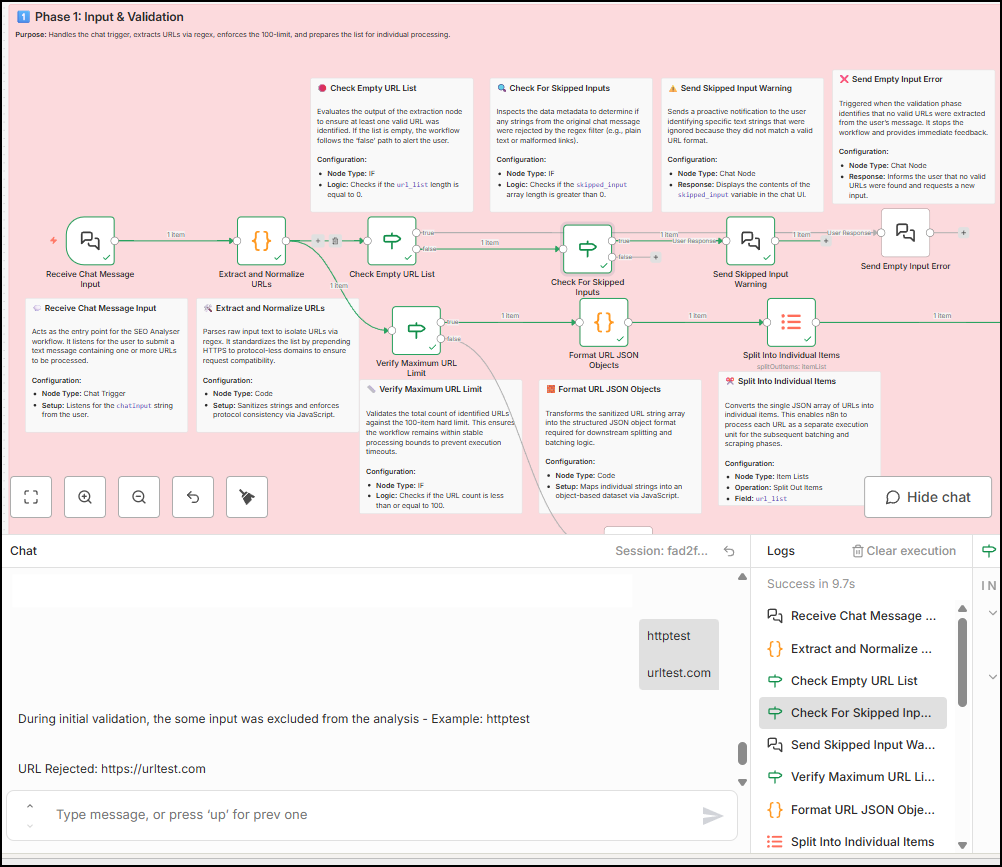
You can replace this limit of 100 with anything you want, just remember that the workflow execution takes time because it is made in a way to support even the sluggish machines that can just run n8n locally.
After we have the clean and nice list of input that prominently appears to be a valid URL, the result is split into a list and then into a loop, which is phase 2 of our workflow.
Phase 2: Fetching and Compliance
It’s not as complex and bad as the name looks, but it is definitely the heart of the workflow. Once the input is made into a list, the loop node sends each URL to the Page fetch node. This node runs a GET request and fetches the page data completely, and also the page headers that come with it. It also fetches the HTTP status code and status message.
I also sent a custom user agent with this request:
Mozilla/5.0 (Windows NT 10.0; Win64; x64) AppleWebKit/537.36 (KHTML, like Gecko) Chrome/124.0.0.0 Safari/537.36 Edg/124.0.0.0You can either remove this completely or change with a latest versions of the browsers. This is done to ensure that maximum servers send the data of the page code rather than this node being limited by security checks.
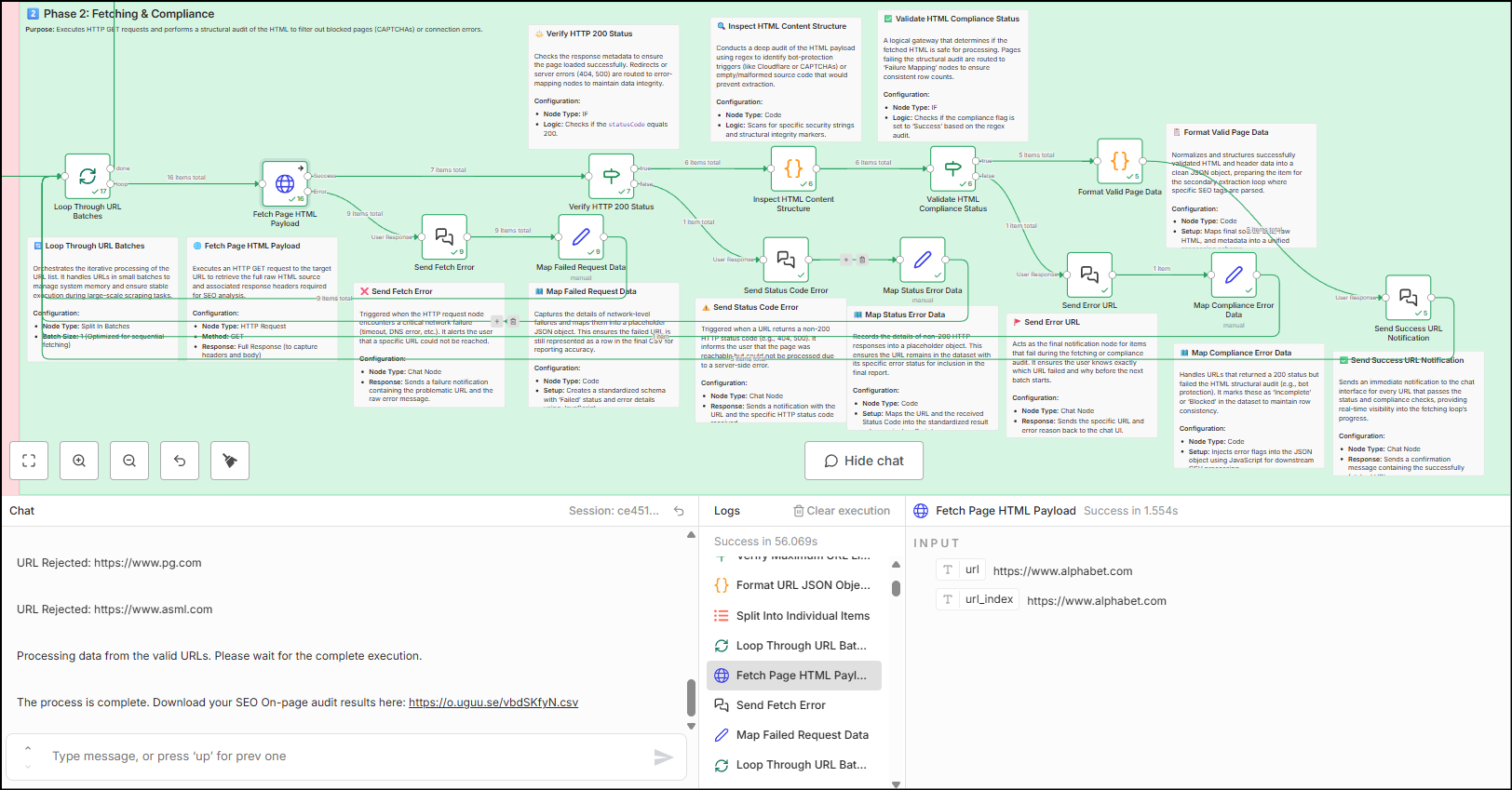
Now there are multiple validations that stem from this HTTP node. If a page is not fetched properly or the node meets with an error, it sends the output in the chat saying that the particular URL is rejected. All successful URLs are then checked by an IF node for the HTTP status code check. If the URL is not 200, the URL is rejected and sent as a chat message. Then, to further check for errors, there is a code node that checks for common error messages in the data received from the page fetch code. If it passes, then only the node proceeds with data formatting and extraction. Otherwise, the URL rejection is again sent to chat.
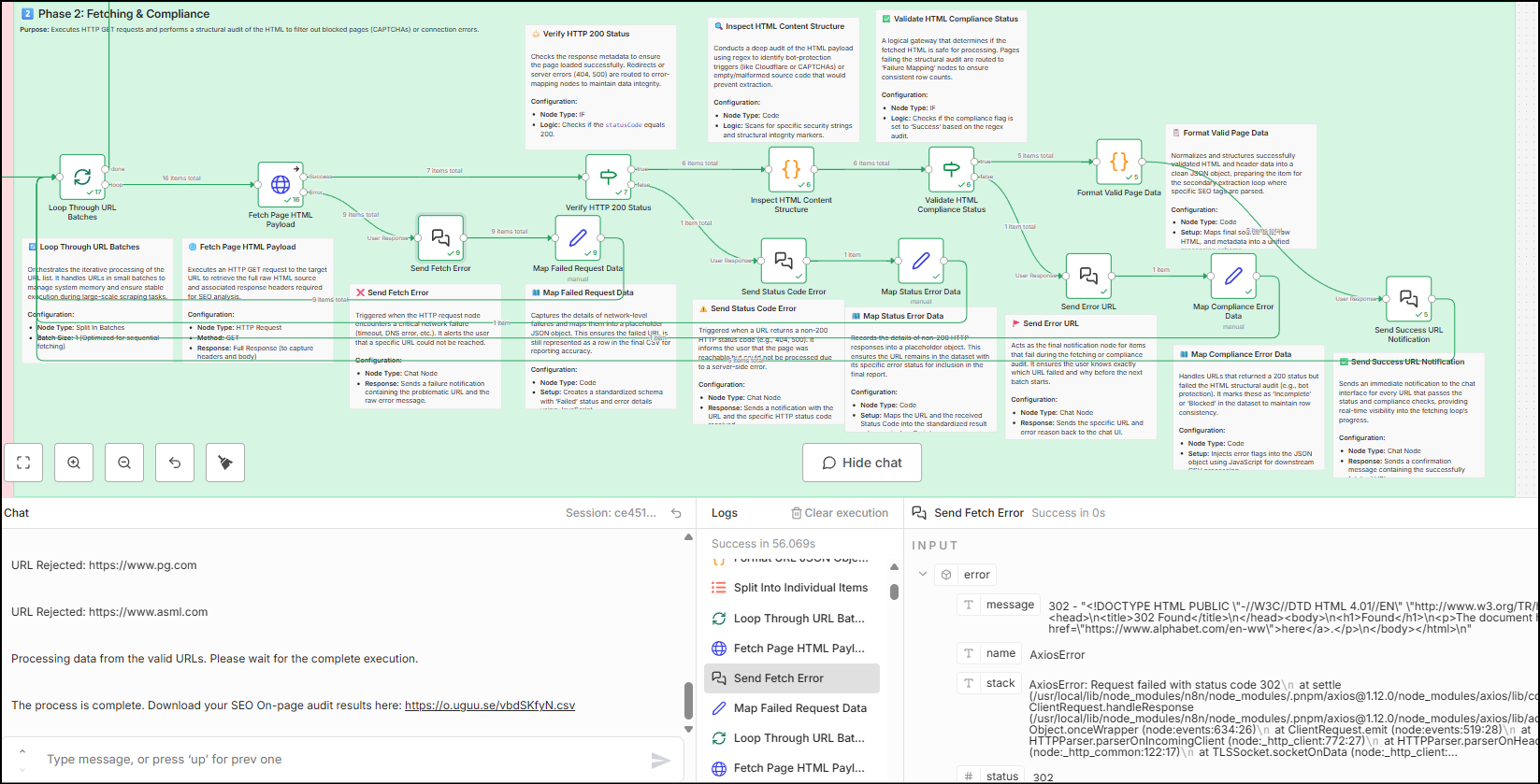
This loop runs till all URLs in the list are gone through these checks. Once this is done, the data is collected at the done branch of the loop node.
Phase 3: Extraction and Preservation
Now that we have the data (HTML data, HTTP headers) from the successful URLs, this phase uses a remove duplicate node to help with removing redundant data. Along with a user information message, there is one more loop that runs through two more critical nodes:
- HTML that extracts key information from the HTML elements (Meta tags, OG, Twitter tags, Hreflang, etc.)
- Code node that takes in the HTTP header data, extracts the 200 HTTP status code, and the X-Robots-Tag. (The meta robots tag is extracted using the HTML node)
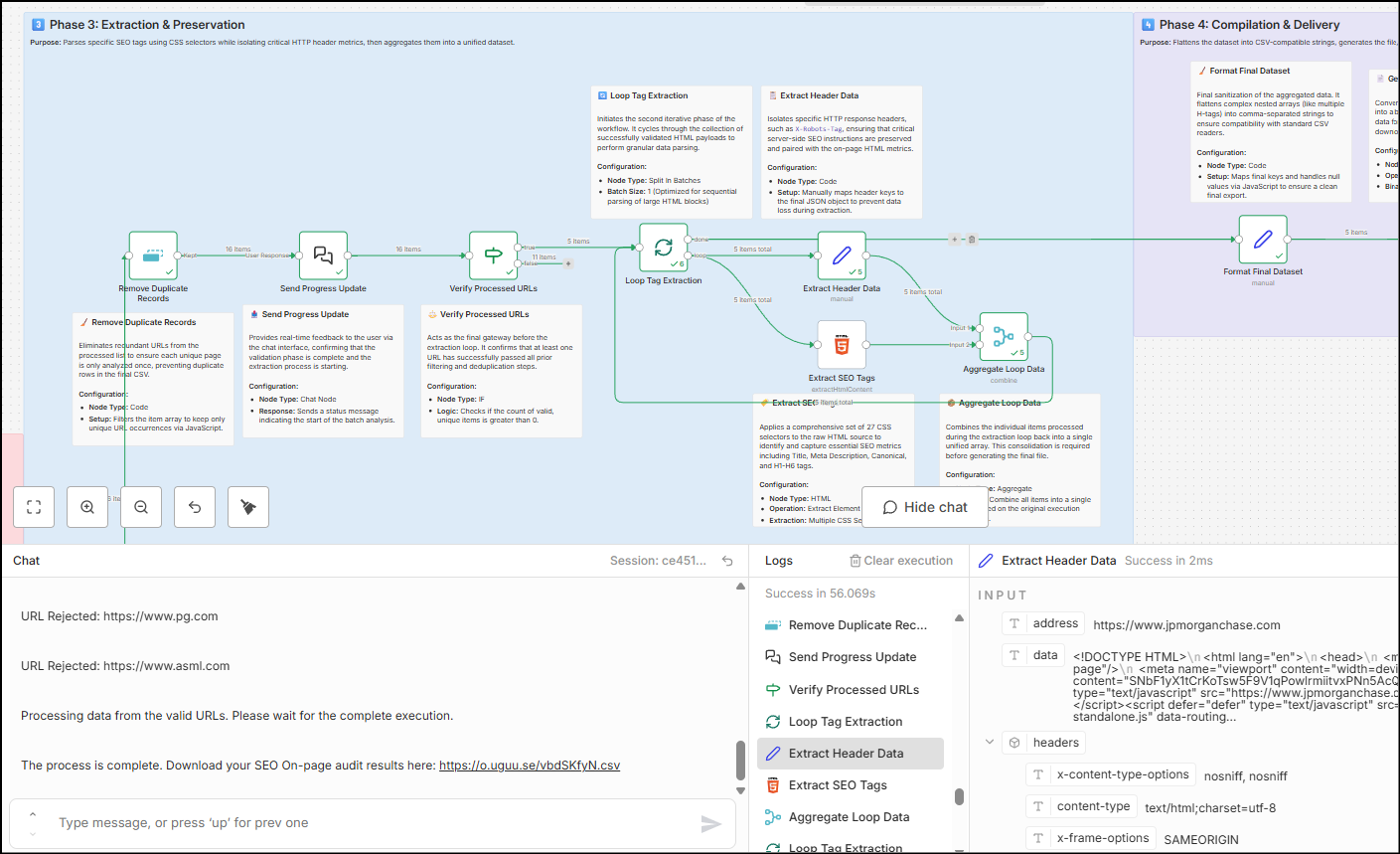
This information is then aggregated to form a clean table and fed back into the loop node. When the loop node finishes with all successful URLs, it throws back the final table that contains the on-page SEO data we need.
Phase 4: Compilation and Delivery
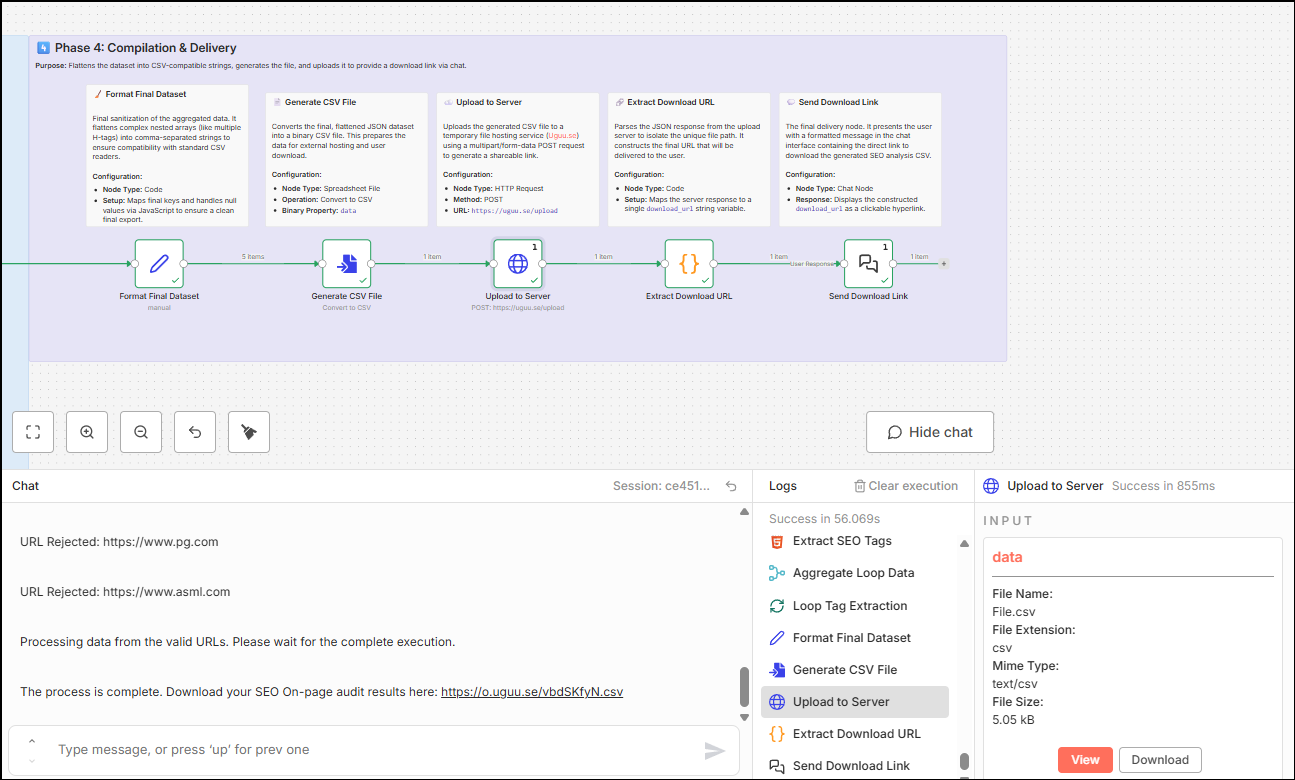
This node is the same as my previous workflows. This phase uses the Set node to format and order the columns in the table. Then this data is sent as binary data (CSV file), which is fed into a free temporary hosting service. The final node sends the downloadable CSV file into the chat. Your workflow user can click the link in the chat to download the CSV file and see the on-page SEO elements in the CSV file.
Workflow Limitations
- Execution time – A 100-URL batch typically takes around 25–30 minutes, because processing is sequential and tuned to avoid rate limits and network instability. Batch size is 1 for both fetching and extraction; this sacrifices speed for reliability and predictable behavior.
- Security walls – Sites behind aggressive bot protection (Cloudflare, CAPTCHA, WAFs) may still reject requests even with compliance checks.
- Temporary hosting – CSVs are hosted on Uguu.se; links expire according to their retention policy, so export or save data if you need it long term.
- Local resources – Speed and stability depend on your own server or machine and its network connection.
- 100-URL ceiling – Hard-coded to keep executions from becoming unmanageable. But it is easily replaceable with your ideal number if you have the computing power and network bandwidth.
Your thoughts?
Let me know if you found this helpful. If you need a thing or two changed here, I’d be happy to do that – connect with me on LinkedIn or via email from the footer/about page and let me know what you need.